محرر SQL
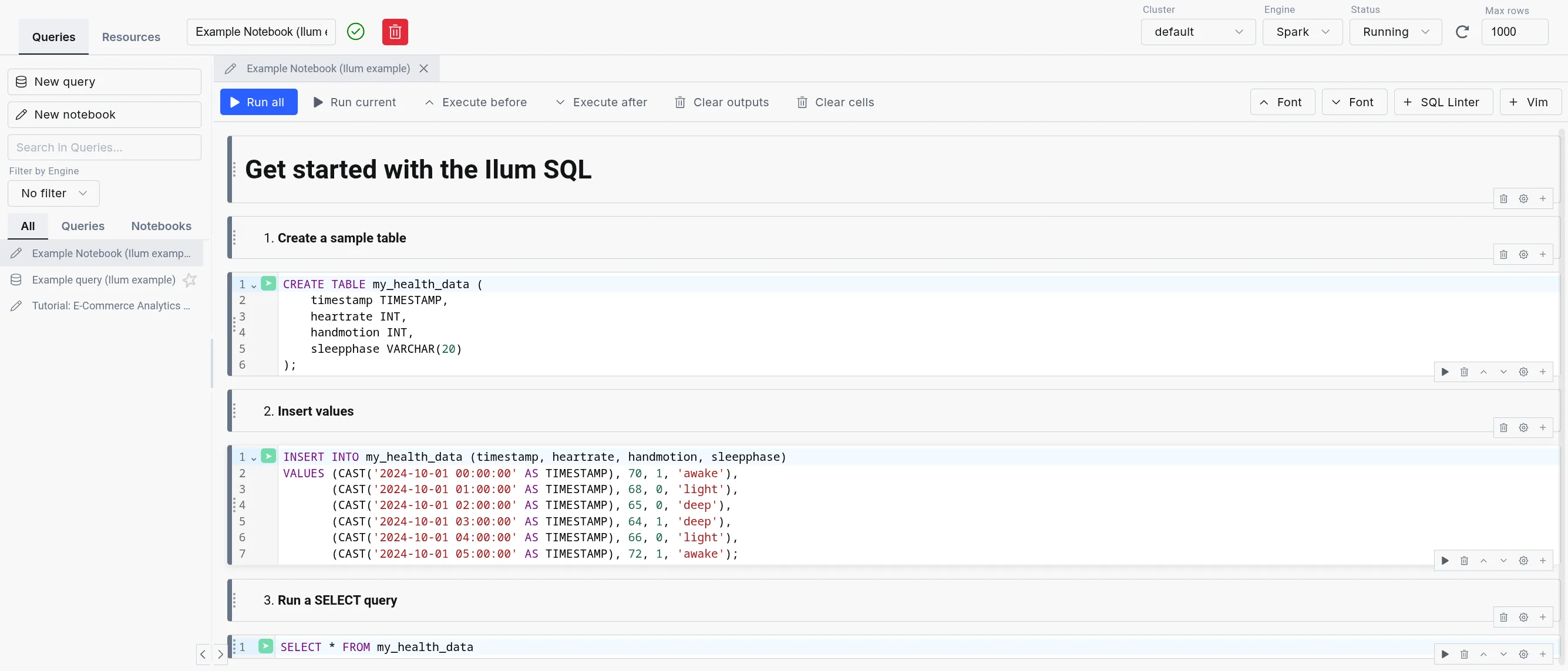
The Ilum محرر SQL (formerly محرر SQL) is the in-product workbench for running SQL across every engine Ilum supports: أباتشي سبارك, الثلاثي, بطة دي بيو Apache Flink. Queries execute through the Apache Kyuubi SQL gateway, with DuckDB integrated as an in-process engine for the lowest possible latency.
Designed for simplicity, the SQL Editor offers an intuitive interface for running queries, exploring data, and gaining insights quickly without writing Scala or Python code.
It is highly configurable through the UI or Helm deployment values, allowing flexibility in, for example, choosing a different table format, like Delta Lake, Apache Hudi, or Apache Iceberg, and in routing queries between engines.
Multi-engine workbench
The SQL Editor exposes the full multi-engine surface of Ilum:
- Engine Selector: Dropdown in the editor toolbar for choosing Spark, Trino, DuckDB, or Flink (when enabled). Live status indicators show the health of each engine.
- Engine lifecycle controls: Start, stop, and restart engines from the UI without leaving the editor. Useful for cycling a Trino coordinator or releasing a Spark session.
- Dialect transpilation: Translate queries between Spark SQL, Trino SQL, DuckDB SQL, and Flink SQL using the built-in transpiler. Useful when promoting an exploratory DuckDB query to a Spark batch job.
- Automatic engine routing: When enabled, the engine router selects the best engine for each query based on data size, workload type, and locality. User selection always overrides the router.
- In-app SQL notebooks: Persistent multi-cell notebooks with per-cell execution, profiling, and visualization, alongside single-query mode.
- Saved queries: Folder-organized query library with bulk operations and a move dialog for reorganization.
- Results tabs: Data, Logs, Statistics, Plan, Export, Visualization. Column-level profiling shows histograms, null counts, and cardinality.
For details on each engine, refer to the Execution Engines documentation.
كيف ستساعدك؟
The SQL Editor is a powerful tool for reporting and debugging during application development. Instead of building an entire Spark SQL program to query your tables, you can submit SQL statements directly within Ilum's interface.
For debugging, the SQL Editor is invaluable. It eliminates the need to repeatedly write, compile, and submit code like:
val مجموعة البيانات = شراره.SQL("select ...")
بدلا من ذلك، يمكنك اختبار عبارات SQL بشكل تفاعلي دون إعادة إنشاء جلسات العمل في كل مرة.
Beyond query results, the SQL Editor offers data exploration and visualization tools, along with logs and execution statistics, giving you deeper insights into the query process.
The SQL Editor is also integrated with all four Ilum data catalogs (Hive Metastore, Project Nessie, Unity Catalog, and DuckLake), which means that you can seamlessly query data from previously created tables.
Get started with the SQL Editor
To use the SQL Editor, you need to deploy Ilum with the SQL feature enabled. For setup instructions, refer to the صفحة الإنتاج.
Once set up, the SQL Editor should be available on the sidebar. Inside, Apache Spark and DuckDB are available as engines by default; Trino and Flink can be enabled per deployment.
Ilum loads in example queries and notebooks to help new users get started quickly.
Example query and notebook loading ممكن by default.
However, you can disable it by setting ilum-core.examples.sqlQuery=false (disables loading queries) and
ilum-core.examples.sqlNotebook=false (disables loading notebooks) in the Helm chart values.
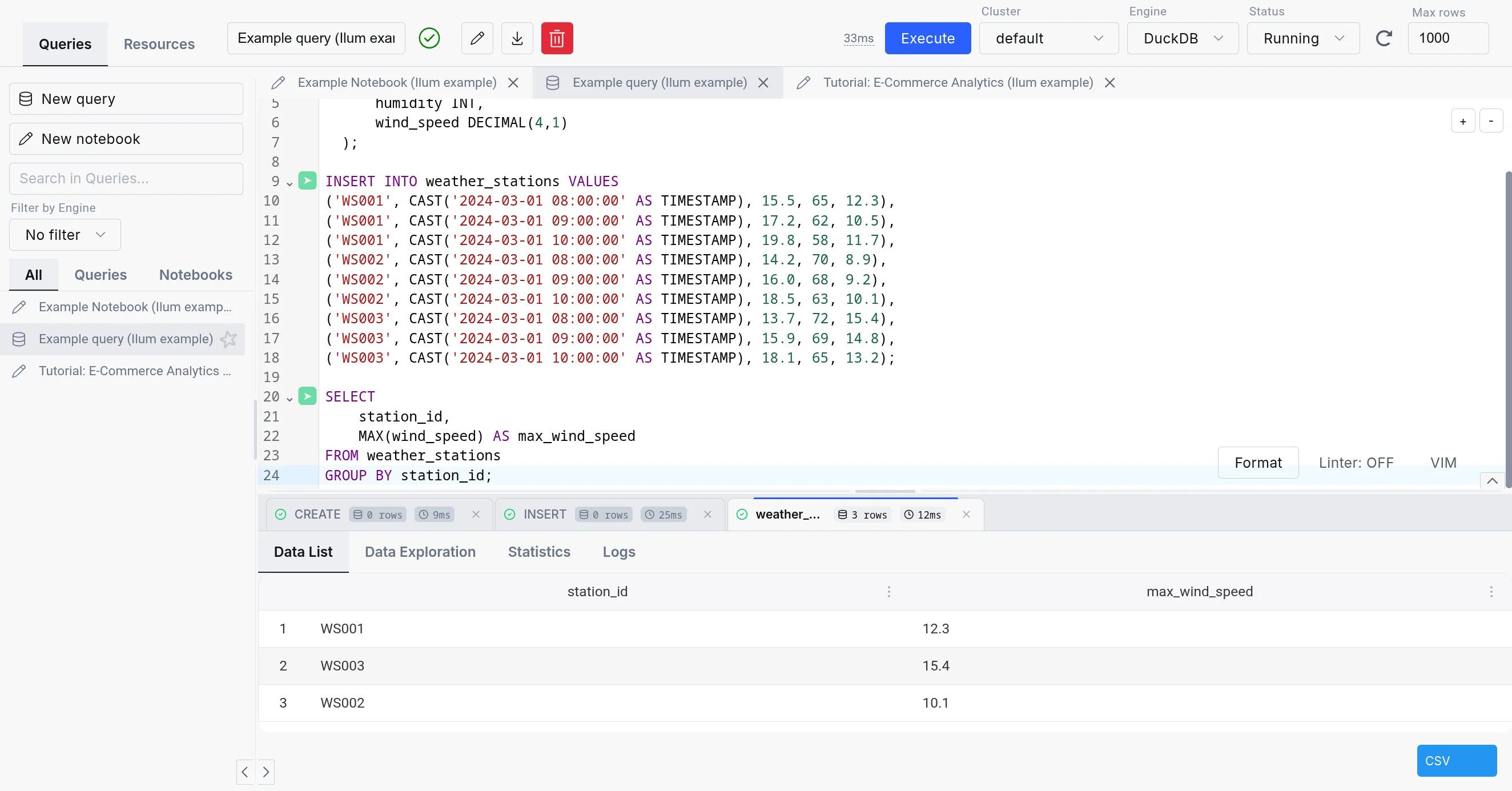
The SQL Editor consists of three parts:
-
SQL query editor: The center part of the SQL Editor, which allows you to write and execute SQL queries. It comes with a simple text editor in the query mode and a notebook-like interface in the notebook mode.
-
The sidebar: Contains your different SQL queries and notebooks in the "Queries" tab, the engine list and lifecycle controls in the "Engines" tab, and a mini version of the مستكشف الجدول in the "Resources" tab.
-
The output: Appears in the bottom part of the screen when you execute a query. It has tabs for Data, Logs, Statistics, Plan, Export, and Visualization, plus column-level profiling.
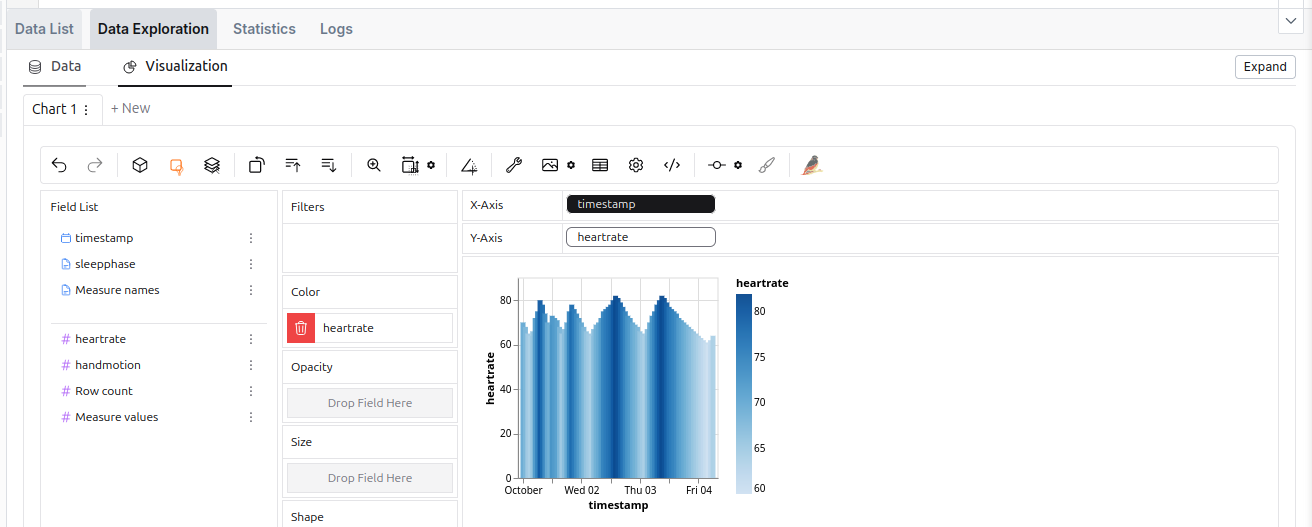 The data exploration tool in the SQL Editor.
محركات بديلة
The SQL Editor supports four engines: أباتشي سبارك, الثلاثي, بطة دي بيو Apache Flink. For an in-depth comparison, refer to the Execution Engines overview.
| شرارة SQL | الثلاثي | بطة دي بي | |
|---|---|---|---|
| نشر | On cluster and dynamic | On cluster | Embedded |
| حالة الاستخدام | ETL, Big data processing | Interactive analytics | Interactive analytics, medium-data ETL, prototyping |
| Storage Support | Comprehensive (with additional JARs) | Sufficient | Lacking (but quickly expanding) |
| Concurrency | High (with tuning) | Very high | Limited |
| Performance | Good for large datasets (with tuning) | Good | Good |
| Overhead | Very high | Medium (always-on coordinator) | Very low (in-process) |
| Lineage support | Extensive | Existing (harder to configure) | With custom extension (supported in Ilum) |
| التمدد | Easy (big extension ecosystem) | Moderate (smaller extension ecosystem) | Limited (smaller extension catalog, C++ based) |
While using the Spark SQL engine will ensure compatibility with most Ilum components, we recommend checking out the other options since they offer a much better ad-hoc query experience than Spark SQL.
When changing an engine, your tables might be accessible differently or not be available at all due to the differences in the underlying storage.
| Metastore | شرارة SQL | الثلاثي | بطة دي بي |
|---|---|---|---|
| Hive Metastore | ✅ | ✅ | 🟨 (subset of functionalities supported with extension) |
| نيسي | ✅ | ✅ | 🟨 (possible, but unergonomic) |
| DuckLake | ❌ | ❌ | ✅ |
| Format | شرارة SQL | الثلاثي | بطة دي بي |
|---|---|---|---|
| Delta Table | 🟨 (extension) | ✅ | 🟨 (للقراءة فقط) |
| مثلجة | 🟨 (extension) | ✅ | 🟨 (with caveats) |
| هودي | 🟨 (extension) | ✅ | ❌ |
| Parquet | ✅ | ✅ | ✅ |
| Avro | 🟨 (extension) | 🟨 (not direct) | ✅ |
| ORC | ✅ | ✅ | ❌ |
| PostgreSQL | 🟨 (JDBC) | ✅ | ✅ |
| DuckDB format | ❌ | ✅ | ✅ |
الثلاثي
Trino هو محرك استعلام SQL موزع عالي الأداء مصمم لتحليلات البيانات الضخمة. إنه يوفر بديلا مقنعا ل Spark SQL ، خاصة بالنسبة للأخف ، أحمال العمل المخصصة حيث تكون سرعة تنفيذ الاستعلام وزمن الانتقال المنخفض من الأولويات. للحصول على تفاصيل التكوين الكاملة، راجع وثائق ترينو.
المقايضة هي أن محركات Spark SQL يتم إطلاقها عند الطلب ، بينما يجب أن يعمل Trino بشكل مستمر في الخلفية ، ويستهلك موارد نظام المجموعة.
لا يتم تمكين Trino المدمج افتراضيا. لإعداده ، تحتاج إلى تكوينه في قيم الدفة الخاصة بك.
توصيل Trino المدمج ب Hive Metastore
بينما يمكن ل Trino العمل بشكل مستقل ، فإن توصيله ب Ilum's Hive Metastore يوفر وصولا سلسا إلى نفس البيانات المتوفرة في Spark. يتطلب هذا التكامل إنشاء كتالوج مخصص في Trino يشير إلى Hive Metastore ، يستخدم تخزين S3 ، ويدعم مجموعة متنوعة من التنسيقات ، تماما كما يفعل Spark.
بشكل افتراضي ، يأتي Trino في Ilum مع ملف إيلوم دلتا الكتالوج، الذي تم تكوينه باستخدام اتصال Hive Metastore الافتراضي،
تخزين S3 الافتراضي ودعم Delta Lake.
تم ذلك عن طريق تعيين التكوين التالي في القيم.yaml ملف مخطط Ilum helm الرئيسي:
ILUM-SQL:
  التكوين:
    ترينو:
      تمكين: صحيح
      كتالوج: إيلوم-الدلتا

ترينو:
  تمكين: صحيح
  كتالوجات:
    إيلوم دلتا: | # اسم الكتالوج الذي تم إنشاؤه
      connector.name=delta_lake # اسم الموصل (بحيرة دلتا هذه المرة)
      delta.metastore.store-جدول-البيانات الوصفية = صحيح # يجعل Trino يخزن البيانات الوصفية في Hive Metastore
      دلتا.سجل-جدول-procedure.enabled=صحيح # تمكين إجراءات تسجيل الجدول في Trino
      hive.metastore.uri=التوفير://ilum-خلية-ميتا ستور:9083 # Hive Metastore URI
      fs.native-s3.enabled=صحيح # تمكين دعم S3
      s3.endpoint=http://ilum-مينيو:9000 # نقطة نهاية S3
      s3.region=الولايات المتحدة-شرق-1 # منطقة S3
      S3.المسار-نمط-الوصول = صحيح # الوصول إلى نمط مسار S3
      S3.AWS-ولوج-المفتاح = minioadmin # مفتاح الوصول S3
      S3.AWS-سر-المفتاح = minioadmin # مفتاح سري S3
تعكس هذه القيم التكوين الافتراضي فقط. إذا كان لديك إعداد مختلف ، فأنت بحاجة إلى ضبط القيم وفقا لذلك.
مثيل Trino الخارجي
من الممكن أيضا توصيل مثيل Trino الخاص بك عن طريق توفير قيم الدفة التالية:
ilum-sql.config.trino.enabled=صحيح
# عنوان URL يشير إلى منسق Trino
ilum-sql.config.trino.url=http://ilum-trino:8080
# اسم الكتالوج الأساسي الذي تريد استخدامه
ilum-sql.config.trino.catalog=نظام
بطة دي بي
DuckDB in Ilum provides low-latency SQL queries without the overhead of spinning up Spark clusters. It’s embedded directly in the backend service, making it ideal for interactive exploration, medium-data ETL, and rapid prototyping.
For detailed DuckDB reference, see the official DuckDB documentation.
As DuckDB is an embedded database, it does not use resources if unused, so it is always available inside Ilum.
DuckDB vs. DuckLake
بطة دي بي is the SQL engine. DuckLake is the storage layer and catalog that provides:
- Multi-user concurrent access to the same tables
- Persistent table metadata across sessions
- Time travel and schema evolution
- Cross-table transaction support
In Ilum, DuckDB uses DuckLake by default for tables created in the SQL Editor. This means CREATE TABLE statements
produce persistent, queryable tables accessible to all users and jobs.
You can also read Parquet files directly without creating tables:
اختار * من 's3://bucket/data/*.parquet';
Use direct Parquet reads for one-off queries. Use DuckLake tables for repeated access and multi-user workflows.
For DuckLake configuration and features, see the DuckLake documentation.
تكوين
DuckDB has minimal configuration in Ilum. The primary setting controls connection lifecycle:
إيلوم كور:
  SQL:
    duckdb:
      idleTimeout: 1h    # Time after which idle DuckDB instances are closed
                         # Reduces memory footprint for infrequent use
No additional settings are required. DuckDB extensions, DuckLake attachment, and catalog integration are configured automatically from your cluster and Helm values.
Resource Considerations
DuckDB shares CPU and memory with the Ilum backend service. For interactive queries it may be fine for some time, but the amount of memory will amass over time. For long-running or larger workloads consider:
- Increase backend resources via
ilum-core.resources.limits.memoryوilum-core.resources.limits.cpu - Consider moving ETL workloads to separate pods via Apache Airflow or dedicated DuckDB services
DuckDB Extensions
DuckDB supports a number of extensions, which can add additional functionality to your pipelines.
In general, they can be installed either from the لب repository,which is included in the default installation, the community repository,
which requires downloading the extension binary file every time you install the extension, or from a custom repository.
For now, Ilum provides two extensions for DuckDB in the custom repository:
hive_metastore- allows you to connect to the Hive Metastore from DuckDBopenlineage- allows you to track the execution of your pipelines using OpenLineage
The extensions are automatically configured with the settings from the helm values and the cluster, so you do not need to do anything else.
We plan to open-source both of these extensions in the future, when we are sure that they are ready for public use.
نصائح والممارسات الجيدة
استخدام عملاء SQL خارجيين مع JDBC
While SQL Editor works purely in the browser, you can also connect your Ilum SQL to external environments that support Hive / Spark JDBC drivers. This way, you can run queries on your Ilum data from your favorite SQL client or BI tool.
للقيام بذلك، قم بإعداد اتصال JDBC باستخدام سلسلة الاتصال التالية:
JDBC: Hive2://<ilum-sql-host>:<thrift-binary-port>/<database-name>;؟ spark.ilum.sql.cluster.id=<cluster-id>
أين:
<ilum-sql-host>هو اسم المضيف لمكون خدمة Ilum SQL الخاص بك (على سبيل المثال،ILUM-SQL بدون رأسأوilum-sql-thrift-binary)<thrift-binary-port>هو المنفذ الذي تتعرض عليه خدمة التوفير (الافتراضي هو10009)<database-name>هو اسم قاعدة البيانات التي تريد الاتصال بها (وضعافتراضيهناك)<cluster-id>هو معرف مجموعة Spark التي تريد الاتصال بها (يمكنك العثور عليها في Ilum Ui)
Using ODBC drivers for external tools
For tools that require ODBC connectivity (such as Excel, Power BI, or legacy reporting systems), connect to ilum using the Simba Spark ODBC Driver.
-
Download the driver from the Simba Spark ODBC Driver page (available for Windows, macOS, and Linux).
-
Configure a DSN (Data Source Name) with these parameters:
Parameter قيمة Host <ilum-sql-host>or LoadBalancer IPPort 10009المصادقه Username/Password (ilum credentials) or No Authentication Thrift Transport Binary SSL Enable for production environments -
Connect from your application using the configured DSN. Most tools provide an ODBC data source selector in their connection dialogs.
JDBC is generally preferred for programmatic access and tools that support it natively. Use ODBC when the client tool does not support JDBC or when connecting from Windows-based applications that rely on the Windows ODBC driver manager.
Using the SQL Editor on datasets from other Ilum’s components
SQL Editor creates tables in the Hive Metastore بشكل افتراضي ، مما يعني أن أي موارد Spark ، والتي تستخدم أيضا نفس metastore ، ستتمكن من رؤية هذه الجداول.
عادة ما تحتوي الوظيفة التي تستخدم metastore على التكوين التالي:
spark.sql.الكتالوجالتنفيذ=خلية
spark.hadoop.hive.metastore.uris=thrift://<hive-metastore-host>:<hive-metastore-port>
# موقع التخزين للمخزن الوصفي (على سبيل المثال ، s3)
spark.hadoop.fs.s3a.access.key=<access-key>
spark.hadoop.fs.s3a.secret.key=<secret-key>
spark.hadoop.fs.s3a.endpoint=<s3-endpoint>
spark.hadoop.fs.s3a.path.style.access=صحيح
spark.hadoop.fs.s3a.fast.upload=صحيح
يمكننا أن نرى أنه يتم توفير uri الخاص ب metastore ويتم استخدام موقع تخزين مشترك.
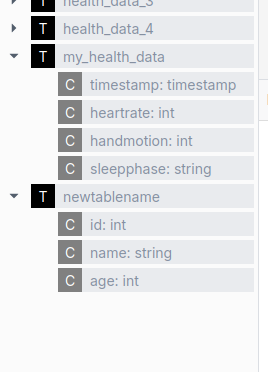 مثال على المكون الذي يستخدم أيضا metastore هو مستكشف طاولة Ilum.
استفد من عناصر تحسين Spark
يوفر Spark SQL العديد من ميزات التحسين التي يمكن أن تحسن أداء الاستعلام بشكل كبير من خلال التقسيم ، التجميع وتنسيقات التخزين المناسبة. تساعد تقنيات التحسين هذه Spark على معالجة الاستعلامات بشكل أكثر كفاءة ، خاصة عند التعامل مع مجموعات البيانات الكبيرة ، عن طريق تقليل كمية البيانات التي يجب مسحها ضوئيا وتحسين تنظيم البيانات على القرص.
يوضح المثال التالي تعريف جدول يتضمن العديد من تقنيات التحسين:
- تقسيم الجدول حسب
تاريخوبلد، مما يسمح ل Spark بتخطي الأقسام غير ذات الصلة - تجميع البيانات حسب
معرف المستخدملتحسين موقع البيانات للصفوف ذات الصلة - فرز البيانات حسب
وقت المشاهدةلاستعلامات نطاق أكثر كفاءة - تنظيم البيانات في حاويات لتوزيع أفضل
- باستخدام السمة
الباركيهالتنسيق المحسن للتخزين العمودي والاستعلام الفعال
خلق جدول page_view
(
    وقت المشاهدة     الباحث,
    معرف المستخدم       بيجينت,
    page_url سلسلة,
    referrer_url سلسلة,
    صفيف الأصدقاء<بيجينت>,
    خريطة العقارات<خيط, خيط>,
    سلسلة DT,
    سلسلة البلد
) التعليق "هذا هو جدول عرض الصفحة"
تقسيم ب(دي تي, بلد)
متفاوت المسافات ب(معرف المستخدم) فرز ب(وقت المشاهدة) إلى 32 الجرادل
تخزين مثل الباركيه
يمكن تحقيق تأثير مماثل باستخدام الميزات التي توفرها تنسيقات الجداول البديلة ، وهي مناقشه ادناه
استخدام ملحقات Spark SQL لزيادة أداء الاستعلامات الخاصة بك
يسمح لك Spark SQL باستخدام العديد من ملحقات SQL لتحسين وظيفة SQL المضمنة.
يتم ذلك عبر spark.sql. الامتدادات مال.
على سبيل المثال، يمكنك إضافة بحيرة دلتا ، والذي يوفر ميزات إضافية للعمل مع جداول دلتا.
ومع ذلك، يمكن أيضا استخدام هذه الخاصية لتمكين الملحقات الأخرى، مثل ملحق تحسين SQL لمحركات تنفيذ Spark. لتمكينه، إما:
- استخدم إحدى صور Ilum Spark الأحدث
- أضف ملف JAR للملحق من مستودع Maven:
org.apache.kyuubi:kyuubi-extension-spark-<SPARK_VERSION>_<SCALA_VERSION>:<KYUUBI_VERSION> - قم بتعديل صورة الحاوية الخاصة ب Spark وأضف ملف JAR إلى مسار الفصل
سيسمح لك ذلك بإضافة الملحق إلى محرك SQL الخاص بك على النحو التالي: spark.sql.extensions=org.apache.kyuubi.sql.KyuubiSparkSQLExtension.
هذه الخاصية عبارة عن قائمة ملحقات مفصولة بفواصل، بحيث يمكنك إضافة ملحقات متعددة.
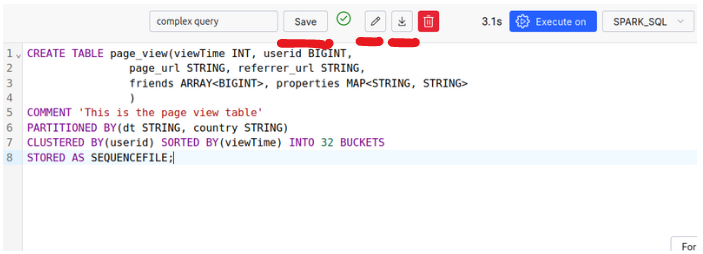
حفظ الاستعلامات واستيراد واستعلامات SQL وتصديرها
The SQL Editor allows you to save your queries for later use, as well as import and export them.
Make use of More Advanced Data Formats: Apache Iceberg, Apache Hudi, and Delta Tables
جداول دلتا
Delta Lake هي طبقة تخزين مفتوحة المصدر تجلب معاملات ACID إلى Apache Spark و أحمال عمل البيانات الضخمة. يستخدم جداول دلتا كتنسيقها الأساسي ، الجمع بين ملفات الباركيه مع سجلات المعاملات. تتعقب هذه السجلات إصدارات الجدول وتلتقط عمليات DML و التعامل مع التزامن مع الأقفال.
بعبارات بسيطة ، تنشئ كل عملية على قسم إصدارا جديدا ، مع الحفاظ على الإصدار السابق ل التراجع السهل إذا لزم الأمر. يساعد ملف سجل المعاملات هذه الإصدارات على إدارة القفل والإصدار التحكم ، وضمان اتساق البيانات.
دلتا ليك سهلة الاستخدام وخيار ممتاز لدمج إضافة ميزات إضافية إلى بيئة Ilum الخاصة بك.
لمزيد من التفاصيل حول إدارة التزامن في Delta Lake مع اورينت (التحكم في التزامن المتفائل) ، و كيف يدمج البث والكتابة المجمعة ، نوصي بزيارة توثيق بحيرة دلتا.
ملامح:
- صيانة خصائص الحمض
- دعم عمليات التحديث والحذف والدمج
- تطور المخطط: تغيير الجداول
- تعيين الإصدار: القدرة على السفر عبر الزمن إلى الإصدارات السابقة من مجموعة البيانات
- تحسين أفضل مقارنة بالتنسيقات التقليدية
- تكامل هذه الميزات لكل من البث والدفعات
كيفية استخدام جداول دلتا؟
By default, Delta Tables are enabled inside Ilum’s SQL Editor. The following configurations are set for you:
spark.sql. الامتدادات=io.delta.sql.DeltaSparkSessionExtension
spark.sql.catalog.spark_catalog=org.apache.spark.sql.delta.catalog.DeltaCatalog
spark.databricks.delta.catalog.update.enabled=صحيح
Therefore, you can make use of Delta Tables inside your SQL Editor without any extra steps.
-
إنشاء جدول دلتا
خلق جدول my_health_data_delta
(
    الطابع الزمني  الطابع الزمني,
    معدل ضربات القلب  الباحث,
    حركة اليد الباحث,
    مرحلة النوم فارشار(20)
) استخدام الدلتا; -
تشغيل بعض عمليات DML
أدخل إلى my_health_data_delta (الطابع الزمني, معدل ضربات القلب, حركة اليد, مرحلة النوم) القيم
(يلقي('2024-10-01 00:00:00' مثل الطابع الزمني), 70, 1, "مستيقظ"),
(يلقي('2024-10-01 01:00:00' مثل الطابع الزمني), 68, 0, "ضوء"),
(يلقي('2024-10-01 02:00:00' مثل الطابع الزمني), 65, 0, "عميق"),
(يلقي('2024-10-01 03:00:00' مثل الطابع الزمني), 64, 1, "عميق"),
(يلقي('2024-10-01 04:00:00' مثل الطابع الزمني), 66, 0, "ضوء");
حذف من my_health_data_delta
أين الطابع الزمني = '2024-10-01 02:00:00';تحديث my_health_data_delta
جبر معدل ضربات القلب = 50
أين الطابع الزمني = '2024-10-01 03:00:00'; -
انظر إلى محفوظات الإصدار والتفاصيل
وصف التاريخ my_health_data_delta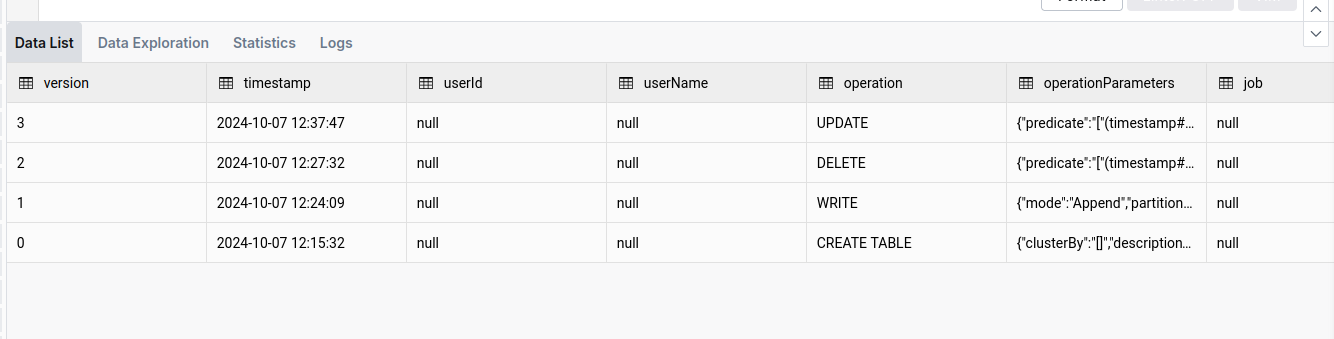
-
استخدام وظيفة السفر عبر الوقت والإصدار
اختار *
من my_health_data_delta الإصدار مثل من 1
أو للسفر إلى تاريخ محدد (على سبيل المثال ، عودة يوم واحد):
اختار *
من my_health_data_delta الطابع الزمني مثل من date_sub(current_date(), 1) -
تنظيف
بينما تم تحسين جداول دلتا للأداء ، يمكن أن تتراكم عدد كبير من الملفات بمرور الوقت. ال
مِكْنَسَة كَهْرَبَائِيَّةتساعد العملية على تنظيف هذه الملفات وتحسين الجدول. يمكنك أن تقرأ عنها هنا.فراغ my_health_data_deltaأو لمعرفة الملفات التي سيتم حذفها (حتى 1000):
فراغ my_health_data_delta تشغيل جاف
أباتشي هودي
في حين أن أباتشي هودي تشبه بحيرة دلتا ، إلا أنها تتمتع بمزاياها الفريدة. في Apache Hudi ، يتم تنظيم كل قسم في مجموعات الملفات. تتكون كل مجموعة ملفات من شرائح، التي تحتوي على ملفات البيانات وملفات السجل المصاحبة. تسجل ملفات السجل الإجراءات والبيانات المتأثرة ، مما يسمح ل Hudi بتحسين عمليات القراءة من خلال تطبيق هذه الإجراءات على الملف الأساسي لإنتاج أحدث طريقة عرض للبيانات.
لتبسيط العملية، التكوين الضغط العمليات ضرورية. ينشئ الضغط شريحة جديدة بملف أساسي محدث، مما يحسن الأداء.
هذا الهيكل ، جنبا إلى جنب مع التحسين الشامل ل Hudi ، يعزز كفاءة الكتابة ، مما يجعله أسرع من التنسيقات البديلة في سيناريوهات معينة. علاوة على ذلك ، يدعم Hudi NBCC (التحكم في التزامن غير المحظور) بدلاً من اورينت (التحكم المتفائل في التزامن) ، وهو أكثر فاعلية في البيئات التي تحتوي على عمليات الكتابة المتزامنة العالية.
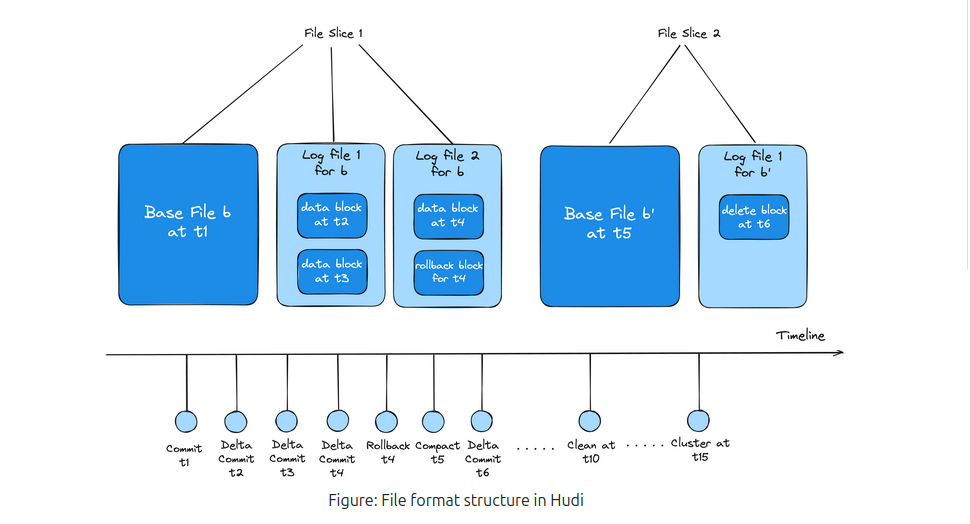
باختصار ، يعد Apache Hudi مناسبا تماما للبيئات ذات عمليات الكتابة المتزامنة الثقيلة و يوفر مزيدا من التحكم في التحسينات المخصصة ، على الرغم من أنه قد يكون أقل سهولة في الاستخدام من Delta Lake.
لمعرفة المزيد حول هذا الموضوع ، يجب عليك زيارة صفحة توثيق أباتشي هودي
كيفية استخدام أباتشي هودي؟
على عكس بحيرة دلتا ، لم يتم تكوين أباتشي هودي مسبقا. لذلك، ستحتاج إلى تغيير تكوين نظام المجموعة وإضافة الخصائص التالية:
{
  "شرارة.جارات.حزمات": "org.apache.hudi:hudi-spark3.5-bundle_2.12:0.15.0",
  "سبارك.سيريالايزر": "org.apache.spark.serializer.KryoSerializer",
  "spark.sql.catalog.spark_catalog": "org.apache.spark.sql.hudi.catalog.HoodieCatalog",
  "spark.sql. الامتدادات": "org.apache.spark.sql.hudi.HoodieSparkSessionExtension",
  "spark.kryo.registrator": "org.apache.spark.HoodieSparkKryoRegistrar"
}
Remember to make sure that the version of the Hudi-spark’s jar is matching the version of the Spark you are using.
بالإضافة إلى ذلك ، نظرا لأن حزمة الجرة غير مثبتة مسبقا ، قد تواجه مشكلة نفاد ذاكرة JVM كومة أثناء تهيئة المحرك. لقراءة المزيد حول هذه المشكلة وكيفية إصلاحها، يرجى الرجوع إلى قسم استكشاف الأخطاء وإصلاحها.
-
إنشاء جدول هودي
خلق جدول my_sales_data_hudi (
    sale_id سلسلة,
    sale_date الطابع الزمني,
    product_id سلسلة,
    كم الباحث,
    ثمن عشري(10, 2)
) استخدام هودي
خصائص TBL (
    نوع = "مور",
    أساسيمفتاح = 'sale_id'
);
لاحظ
النوع = "mor"الخاصية ، والتي تعني دمج عند القراءة. تغير هذه الخاصية نوع الجدول، الذي يوازن بين التحسين بين القراءة والكتابة العمليات. -
إجراء عمليات DML
أدخل إلى my_sales_data_hudi (sale_id, sale_date, product_id, كم, ثمن) القيم
("S001", يلقي('2024-10-01 10:00:00' مثل الطابع الزمني), "P001", 10, 99.99),
("S002", يلقي('2024-10-01 11:00:00' مثل الطابع الزمني), "P002", 5, 49.99),
("S003", يلقي('2024-10-01 12:00:00' مثل الطابع الزمني), "P003", 20, 19.99),
("S004", يلقي('2024-10-01 13:00:00' مثل الطابع الزمني), "P004", 15, 29.99),
("S005", يلقي('2024-10-01 14:00:00' مثل الطابع الزمني), "P005", 8, 39.99);
تحديث my_sales_data_hudi
جبر ثمن = 89.99
أين sale_id = "S001";حذف من my_sales_data_hudi
أين sale_id = "S003"; -
قائمة الالتزامات
دعا show_commits (جدول => 'my_sales_data_hudi', حد => 5)
لاحظ هنا
commit_time، والذي يعرض وقت الالتزام. يمكننا استخدام هذه القيمة لأداء السفر عبر الزمن. -
استخدام وظيفة السفر عبر الزمن
دعا rollback_to_instant(جدول => 'my_sales_data_hudi', instant_time => '<commit-time-from-last-step>');سيقوم هذا الأمر بإرجاع الجدول إلى الحالة التي كان فيها في وقت الالتزام المحدد. ضع في اعتبارك أنه يمكنك عكس الالتزام الأخير فقط ، لذلك إذا كنت تريد العودة إلى أبعد من ذلك ، تحتاج إلى إجراء عمليات تراجع متعددة.
أباتشي آيسبرغ
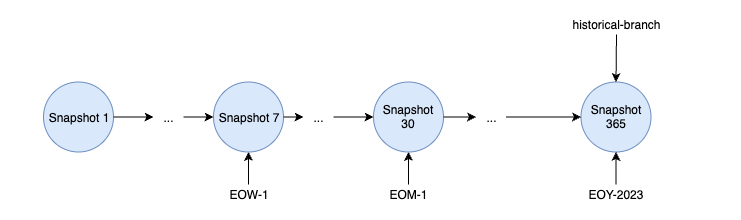
Apache Iceberg هو تنسيق جدول عالي الأداء مصمم خصيصا لبحيرات البيانات ، تقدم إمكانات فريدة مقارنة بالتنسيقات الأخرى. بنيت حول هندسة معمارية مميزة ، يستخدمها Iceberg لقطات لإدارة حالات الجدول، تجنب الاعتماد على سجلات المعاملات التقليدية. يلتقط هذا التصميم المستند إلى اللقطة الحالة الكاملة للجدول في نقاط زمنية محددة.
تحتوي كل لقطة على قائمة البيان، والتي بدورها تشير إلى بيانات متعددة. تنظم هذه البيانات مؤشرات إلى ملفات بيانات محددة وتحتفظ بالبيانات الوصفية ذات الصلة ، تمكين Iceberg من تتبع التغييرات بكفاءة دون تكرار ملفات البيانات عبر اللقطات. يعمل هذا الأسلوب على تحسين التخزين، حيث يمكن للقطات إعادة استخدام ملفات البيانات الموجودة، مما يقلل من التكرار.
يوفر Iceberg أيضا ميزات قوية مثل التفرع ووضع العلامات, السماح للمستخدمين بإنشاء فروع للجداول وتعيين علامات يمكن للبشر قراءتها للقطات. هذه الميزات ضرورية للتحكم في الإصدار ، تمكين الفرق من إدارة التحديثات المتزامنة واختبار التغييرات قبل إلزامها بالإنتاج.
مع خيارات تنظيم البيانات المرنة وقدرات تعيين الإصدار القوية، يتيح Apache Iceberg إدارة بيانات قابلة للتطوير وأداء لبحيرات البيانات الحديثة.
المزيد عن وثائق Apache Iceberg
كيفية استخدام Apache Iceberg؟
على عكس بحيرة دلتا ، لم يتم تكوين أباتشي هودي مسبقا. لذلك، ستحتاج إلى تغيير تكوين نظام المجموعة وإضافة الخصائص التالية:
{
  "شرارة.جارات.حزمات": "org.apache.iceberg: iceberg-spark-runtime-3.5_2.12: 1.6.1",
  "spark.sql. الامتدادات": "org.apache.iceberg.spark.extensions.IcebergSparkSessionExtensions",
  "spark.sql.catalog.spark_catalog": "org.apache.iceberg.spark.SparkSessionCatalog",
  "spark.sql.catalog.spark_catalog.type": "خلية النحل",
  "spark.sql.catalog.spark_catalog.uri": "thrift://ilum-hive-metastore:9083"
}
Remember to make sure that the version of the Iceberg’s jar is matching the version of the Spark you are using and that the Hive Metastore is available at the specified URI.
بالإضافة إلى ذلك ، نظرا لأن حزمة الجرة غير مثبتة مسبقا ، قد تواجه مشكلة نفاد ذاكرة JVM كومة أثناء تهيئة المحرك. لقراءة المزيد حول هذه المشكلة وكيفية إصلاحها، يرجى الرجوع إلى قسم استكشاف الأخطاء وإصلاحها.
-
قم بإنشاء جدول جبل جليدي:
خلق جدول weather_stations
(
    station_id سلسلة,
    reading_time الطابع الزمني,
    درجة الحرارة عشري(4,1),
    رطوبة الباحث,
    wind_speed عشري(4,1)
) استخدام مثلجة -
إدراج البيانات في الجدول
أدخل إلى weather_stations القيم
("WS001", يلقي('2024-03-01 08:00:00' مثل الطابع الزمني), 15.5, 65, 12.3),
("WS001", يلقي('2024-03-01 09:00:00' مثل الطابع الزمني), 17.2, 62, 10.5),
("WS001", يلقي('2024-03-01 10:00:00' مثل الطابع الزمني), 19.8, 58, 11.7),
("WS002", يلقي('2024-03-01 08:00:00' مثل الطابع الزمني), 14.2, 70, 8.9),
("WS002", يلقي('2024-03-01 09:00:00' مثل الطابع الزمني), 16.0, 68, 9.2),
("WS002", يلقي('2024-03-01 10:00:00' مثل الطابع الزمني), 18.5, 63, 10.1),
("WS003", يلقي('2024-03-01 08:00:00' مثل الطابع الزمني), 13.7, 72, 15.4),
("WS003", يلقي('2024-03-01 09:00:00' مثل الطابع الزمني), 15.9, 69, 14.8),
("WS003", يلقي('2024-03-01 10:00:00' مثل الطابع الزمني), 18.1, 65, 13.2); -
إنشاء علامة من اللقطة الحالية
تغيير جدول weather_stations خلق العلامه `initial_state` -
قم بإجراء بعض التعديلات على البيانات
تحديث weather_stations
جبر
  درجة الحرارة = 16.5
أين
  station_id = "WS001"
  و reading_time = يلقي('2024-03-01 08:00:00' مثل الطابع الزمني)
حذف من weather_stations أين station_id = "WS002" -
سرد جميع اللقطات
اختار * من spark_catalog.افتراضي.weather_stations.لقطات
حفظ الطابع الزمني (
commited_at) من اللقطة التي تريد السفر عبر الزمن إليها لوقت لاحق. -
الحصول على السجل
اختار * من spark_catalog.افتراضي.weather_stations.تاريخ -
التراجع إلى علامة معينة
دعا spark_catalog.نظام.set_current_snapshot (
  جدول => "spark_catalog.default.weather_stations",
  الرقم المرجعي => 'initial_state'
) -
السفر عبر الزمن إلى لقطة معينة
اختار * من weather_stations الطابع الزمني مثل من <الطابع الزمني-من-درج-5>
How to use UDFs in the SQL Editor?
UDFs (User Defined Functions) are a powerful feature in SQL that allows you to define custom functions to use in your queries. They are also supported in the SQL Editor, allowing you to extend the functionality of your queries.
-
إنشاء فصل دراسي ل UDF الخاص بك
حزمة example

استورد org.apache.hadoop.خلية.ql.exec.UDF

فصل سكالا یو دي اف extends UDF {
  مواطنه evaluate(str: String): Int = {
    str.length()
  }
}
تأكد من تضمين التبعية اللازمة ل
الخلية التنفيذية: 3.1.3في مشروعك:<تبعية>
<معرف المجموعة>org.apache.hive</معرف المجموعة>
<معرف القطعة الأثرية>خلية تنفيذية</معرف القطعة الأثرية>
<الإصدار>3.1.3</الإصدار>
</تبعية> -
اصنع عبوة جرة وضعها في التخزين الموزع

تأكد من تذكر المسار المؤدي إلى ملف البرطمان.
-
Add it to the SQL Editor spark session
جمع مرطبان '<the-path-to-your-jar-file>' -
قم بإنشاء دالة مرتبطة ب udf الذي حددته
خلق
أو استبدل دالة سكالا یو دي اف مثل "مثال. ScalaUDF -
استخدمه في استعلام
اختار اسم, سكالا یو دي اف(اسم)
من NewtableName
استكشاف الاخطاء
It is useful to know that when executing SQL queries from the SQL Editor page, the SQL execution engines are visible as normal Ilum Jobs. This means that you can monitor their state, check logs and statistics, just like any other job in the "Jobs" tab.
كومة JVM خارج الذاكرة أثناء إرسال الشرارة
إذا وجدت خطأ مثل هذا في سجلات تشغيل المحرك:
استثناء في مؤشر ترابط "رئيسي" io.fabric8.kubernetes.client.KubernetesClientException: مساحة كومة الذاكرة المؤقتة في Java
    في io.fabric8.kubernetes.client.dsl.internal.OperationSupport.waitForResult (OperationSupport.java:520)
    في io.fabric8.kubernetes.client.dsl.internal. OperationSupport.handleResponse(OperationSupport.java:535)
    ...
    في org.apache.spark.deploy.SparkSubmit$.main(SparkSubmit.scala:1129)
    في org.apache.spark.deploy.SparkSubmit.main(SparkSubmit.scala)
الناجم عن: java.lang.OutOfMemoryError: مساحة كومة الذاكرة المؤقتة في Java
    ...
من المحتمل أن يكون سببه حجم كومة JVM الافتراضي لإرسال الشرارة الداخلي ل Ilum صغير جدا بالنسبة لمهمتك.
لإصلاح ذلك، يمكنك التبديل إلى إرسال الشرارة الخارجية. بهذه الطريقة ، لن تكون عملية إرسال الشرارة مقيدة بموارد جراب Ilum.