Ilum Pipeline Studio - Authoring Spark Declarative Pipelines
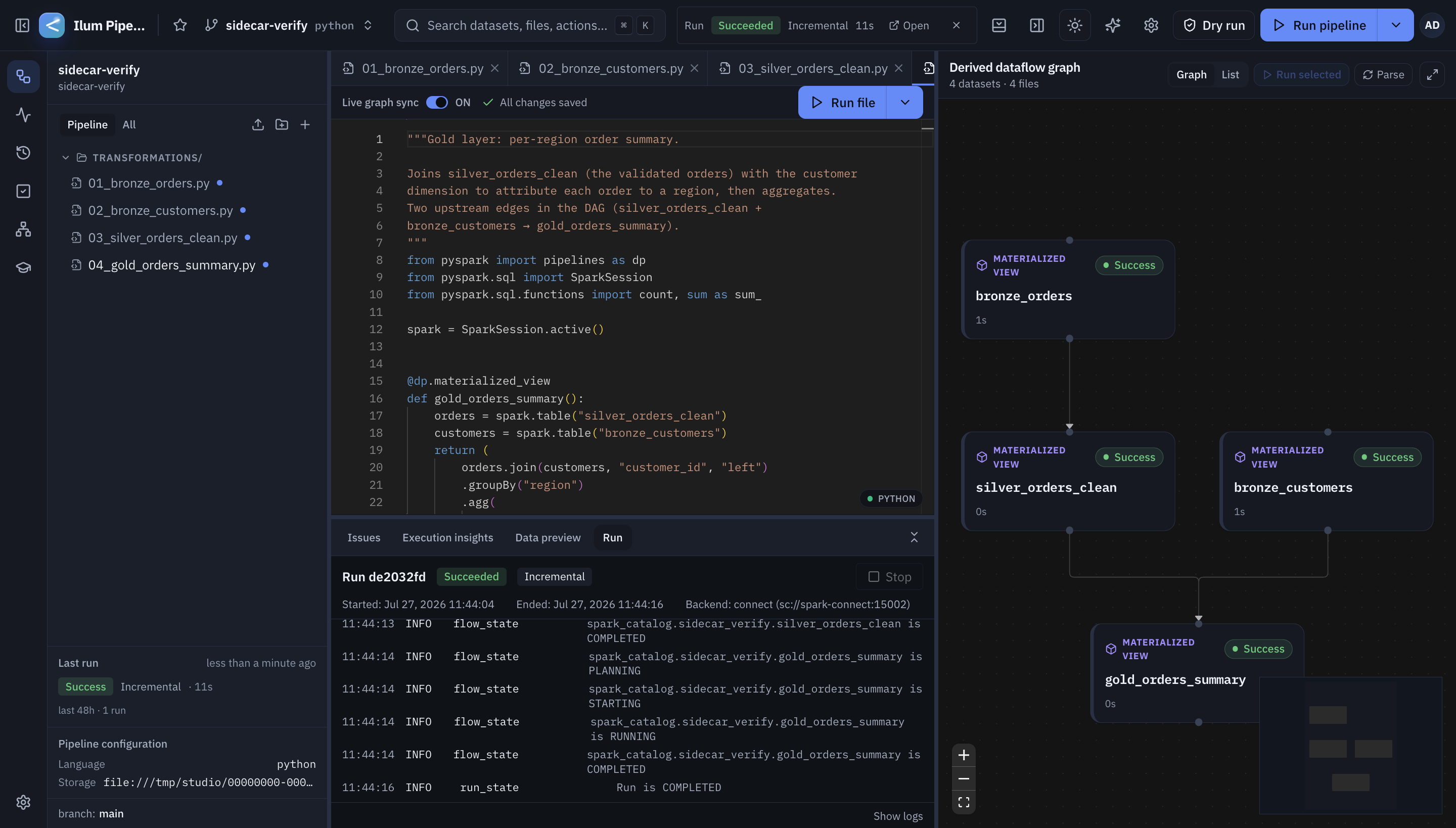
Ilum Pipeline Studio is a self-hostable web IDE for Apache Spark Declarative Pipelines (SDP), the declarative pipeline framework introduced in Spark 4.1. Datasets are authored in Python or SQL, and the studio parses that source into a dataflow graph, validates it, runs it on real Spark, and streams live run state and logs back to the browser.
Within إيلوم, Pipeline Studio is a bundled, optional module. When enabled, it is deployed into the same Kubernetes cluster as the rest of the stack and is reachable directly from the Ilum navigation. Runs are dispatched to Ilum's Spark engine, so each pipeline update executes against a managed, per-run Spark driver rather than a shared local session.
معمار
Pipeline Studio is composed of three cooperating services plus its own persistence, all running inside the Ilum cluster:
- Gateway (
studio-server): a Rust service built onaxum. It exposes the REST and WebSocket API, verifies OIDC tokens, multiplexes live run and log channels, and owns project, file, and run metadata. It follows a hexagonal design — a domain core with no I/O, satisfied by infrastructure adapters for PostgreSQL, S3, and the event bus. - AST Sidecar: a Python service (FastAPI and gRPC) that parses SDP source with LibCST and sqlglot, and — on dry-run and run — executes the user's pipeline code via
pyspark[pipelines]. This is the only component that runs user code. - Frontend: a TypeScript single-page application (Vite, React, Monaco editor, and React Flow for the dataflow graph).
Persistence and messaging are provided by PostgreSQL (project, file, and run metadata), S3-compatible object storage (pipeline source blobs), and an event bus for live run and log events (in-process for a single gateway replica, or NATS JetStream when scaled out). Execution targets سبارك كونكت against Spark 4.1 or later; the reference runtime is Spark 4.1.1.
Deployment modes
Pipeline Studio can be run in either of two ways:
- As an Ilum module (integrated): Pipeline Studio is deployed alongside the rest of the Ilum stack, and runs are dispatched to Ilum's Spark engine, which provisions a dedicated Spark driver for each run. This provides per-run isolation, reuses Ilum's shared PostgreSQL and object storage, and follows Ilum's active theme. Access to the embedded studio is gated by Ilum's role-based access control, though authentication to Pipeline Studio itself is currently separate from the Ilum session (see the note under Deploying in Ilum, below). This is the mode described throughout this page and the recommended choice for shared, multi-user deployments.
- As a standalone application: Pipeline Studio runs on its own — via Docker Compose for local evaluation, or its own Helm chart — with no dependency on Ilum.
When run standalone, the following differences apply:
- Execution model: the gateway dials a single, fixed Spark Connect server and shares one Spark session across runs, so runs serialize rather than executing on an isolated driver provisioned per run.
- No Ilum core: dispatch to Ilum's Spark engine and its per-run driver isolation are not available; runs execute against the single shared Spark Connect session instead.
- Self-contained storage: Pipeline Studio provisions and manages its own PostgreSQL and object storage, rather than the shared Ilum services the module mode connects to. Authentication is handled by Pipeline Studio in both modes, so it is not a difference between them.
Standalone mode is intended primarily for local evaluation and development.
Authoring pipelines
In case you want to check out an extensive guide on how to properly create declarative pipelines in Apache Spark, you can go to the official guide. In this section, we will try to show you one example of how to create a simple pipeline using Ilum Pipeline Studio.
Pipelines are authored as datasets — materialized views, streaming tables, temporary views, and sinks — written in Python or SQL. Pipeline Studio allows you to author your datasets directly in the built-in code editor which supports syntax highlighting and smart completions for both languages. File edits are auto-saved into per-project versions.
As source is written, the AST Sidecar parses it statically and builds a dataflow graph: each dataset becomes a node, and each read of another dataset becomes an edge. Streaming reads are marked distinctly from batch reads. Parsing is conservative — it recognizes the SDP constructs it models and reports diagnostics without executing anything, so the graph is available before a run is triggered.
Here is an example of how it looks like in the actual UI:
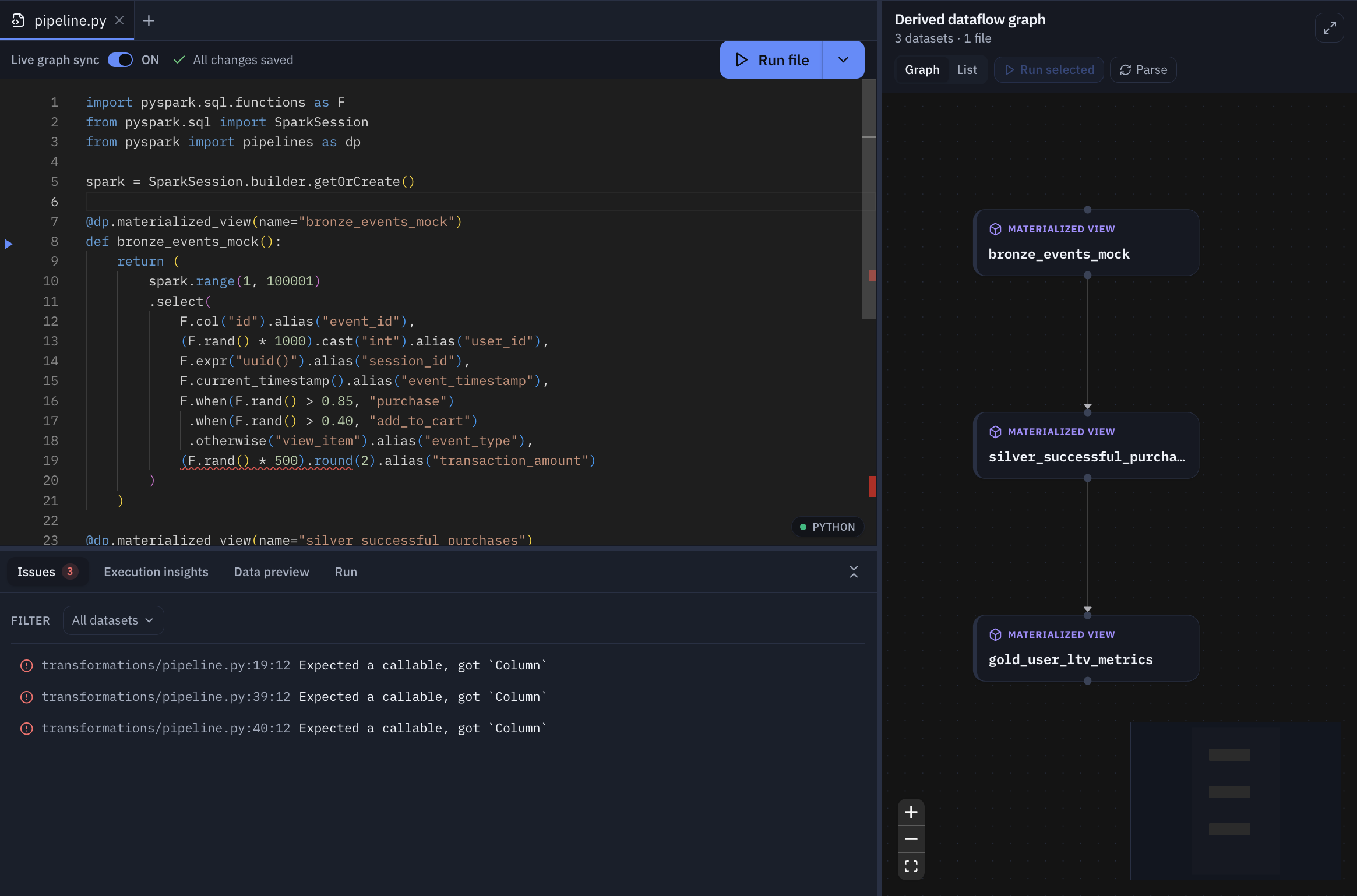
As you can see, Pipeline Studio successfully built the dataflow graph and highlighted various code issues that it discovered.
Now, let's consider a simple example of a data pipeline that you may build using Python. Let's define a couple of datasets:
من بايسبارك استورد pipelines مثل dp


@dp.materialized_view(
    اسم="orders_clean",
    comment="Deduplicated orders",
    partition_cols=["order_date"],
)
مواطنه orders_clean():
    أعاد شراره.قرأ.جدول("orders_raw")


@dp.جدول
مواطنه events():
    أعاد شراره.readStream.جدول("events_landing")
Data-quality expectations are recognized and surfaced in the editor and graph. Definitions written with @dp.expect, @dp.expect_or_drop, @dp.expect_or_fail, and their expect_all variants capture the expectation name, its predicate, and the on-violation policy (warn, drop, or fail).
@dp.expect_or_drop("valid_amount", "amount > 0")
@dp.expect_all({"has_id": "id IS NOT NULL", "has_ts": "ts IS NOT NULL"})
@dp.materialized_view
مواطنه billable():
    أعاد شراره.قرأ.جدول("orders_clean")
SQL authoring is supported in parallel: CREATE MATERIALIZED VIEW, CREATE STREAMING TABLE, and related SDP statements are parsed into the same graph model.
For the full matrix of which SDP constructs are modeled today, refer to the Apache Spark Declarative Pipelines programming guide and the Pipeline Studio construct-support reference.
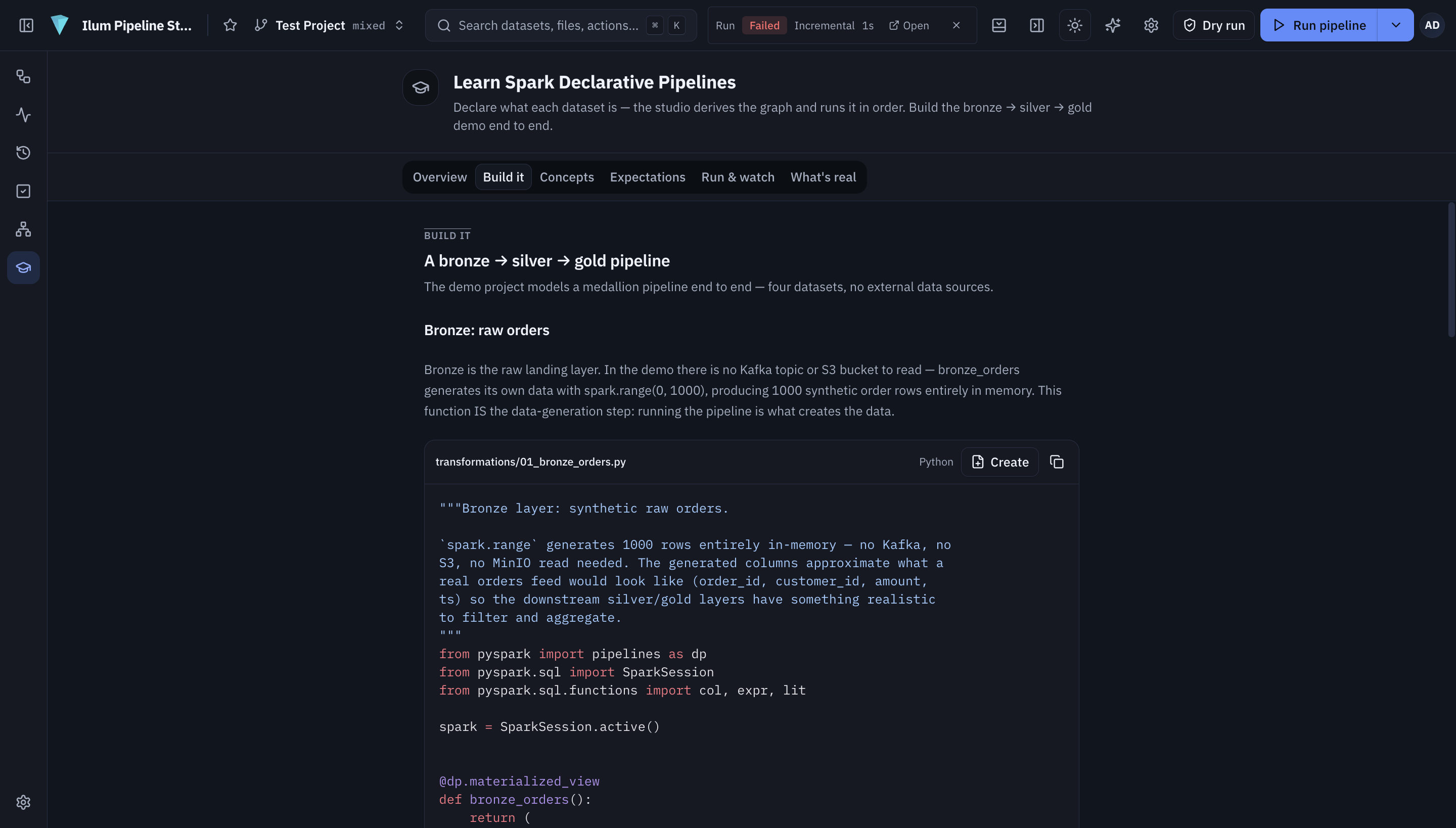
Also, if you want to get more hands-on experience, you should definitely check out the "Learn" section in Pipeline Studio. It exposes examples that you can follow in order to build your first data pipelines step-by-step.
Running and observing pipelines
The following run actions are available: dry-run (validate the pipeline without a run backend), ركض (trigger an update), full-refreshو وقف.
When a pipeline is run in إيلوم mode, the update is dispatched to Ilum's Spark engine, which owns the driver for that run. Run lifecycle state and driver logs stream back to the browser over dedicated WebSocket channels keyed by run identifier. Run states are persisted from the SDP event log, and a bounded sample of a dataset's output can be previewed from the live Spark session.
The Pipeline Editor
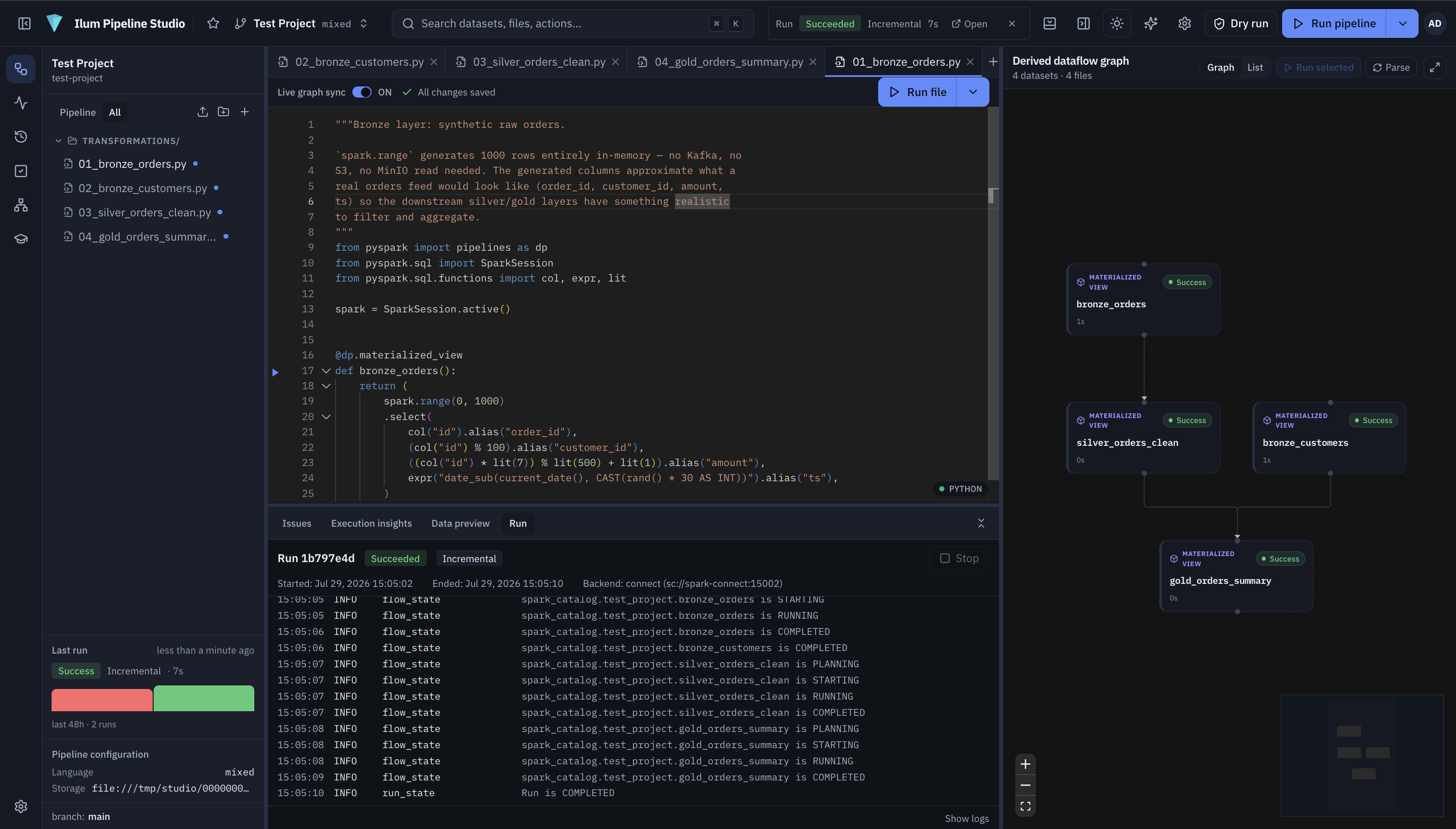
The editor is the main workspace, where pipelines are both authored and launched without leaving the page. A run can be started from the Run split button in the top bar (its caret selects the run kind, or Run with options… opens a dialog for per-run Spark-config overrides), from the Run file button on the editor toolbar (runs only the datasets defined in the active file), or from the ▶ glyph in the gutter next to a dataset definition (runs just that one dataset).
After a run is submitted, the editor stays open and the run is tracked inline: a bottom Run panel shows the live flow-state timeline, the dataflow graph tints its nodes as state events arrive, and a status pill in the header reflects the run's overall state. A bounded sample of any dataset's output can be inspected from the data-preview panel during a live run.
رصد
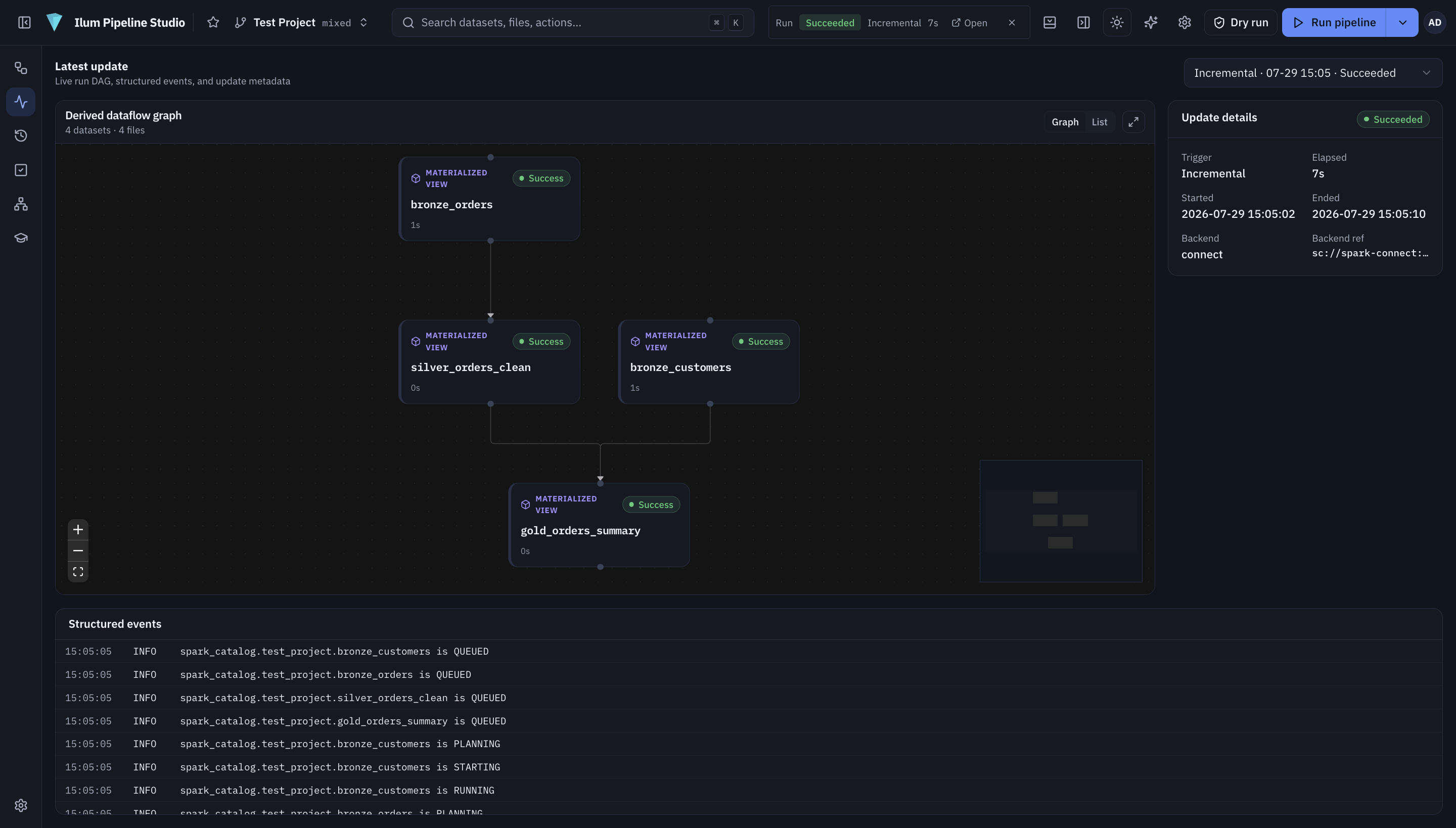
ال رصد screen is the live, read-only view of a single pipeline update. An update selector in the header lists every run recorded for the project — most recent first, each labeled by kind, start time, and state — and the latest run is shown by default.
The left pane reuses the dataflow graph in read-only monitor mode: nodes are tinted by each dataset's latest flow state, edges animate while data flows into a running dataset, and when a flow fails every dataset downstream of it is dimmed as blocked. The bottom Structured events panel is a timestamped, chronological log of every state transition in the selected run — each row showing the event time, a level (معلومات, warn, error), and a one-line summary such as orders_clean → RUNNING. Because events stream live, both the graph and the log fill in mid-run rather than all at once.
Run history
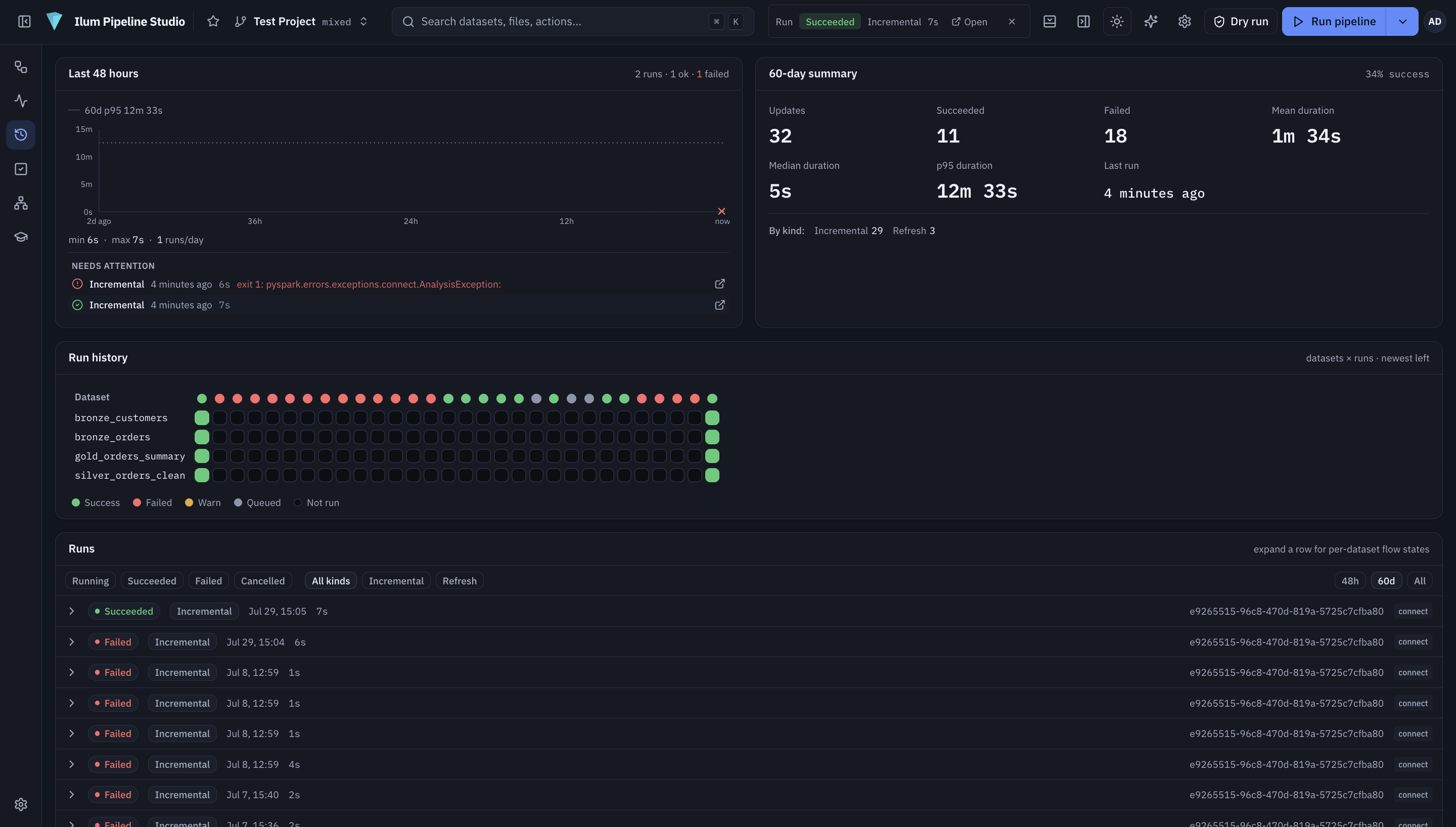
ال Run history screen is a project-wide view of every run, useful for spotting which datasets break, how often runs succeed, and how long they take. It combines a last-48-hours bar chart (one bar per finished run, colored by outcome and sized by duration), a 60-day summary (total updates, success rate, and mean, median, and p95 durations, with a breakdown by run kind), and an Airflow-style datasets × runs grid in which rows are datasets and columns are runs, each cell colored by that dataset's outcome in that run. Clicking any cell or column header jumps straight to that run in Monitoring.
Deploying in Ilum
Pipeline Studio ships as an optional module in the Ilum all-in-one Helm chart and is disabled by default. It can be enabled with the Ilum CLI or with Helm directly.
Using the Ilum CLI
On a running Ilum release, enable the module with:
ilum module enable pipeline-studio
The CLI resolves and applies the module's dependencies automatically (Pipeline Studio requires the Ilum لب module). To include it in a fresh installation instead, pass it to ilum install:
إيلوم install --module pipeline-studio
For the full set of module commands — listing, inspecting, enabling, and disabling — see Working with Modules.
Using Helm
Alternatively, enable the module directly through Helm at install or upgrade time:
ترقية Helm --install ilum ilum / ilum \
  --جبر pipelineStudio.enabled=صحيح
When enabled, Ilum wires the module up automatically, with no additional configuration required:
- Object storage: a dedicated bucket is provisioned in the cluster's S3-compatible store, and the gateway's credentials are sourced from Ilum's shared object-storage secret.
- قاعدة بيانات: a
pipeline_studiodatabase is created in Ilum's shared PostgreSQL, and the password is read from the existing PostgreSQL secret. - Execution: the module defaults to
إيلومrun mode, dispatching runs to Ilum's Spark engine.
The studio is served through the Ilum gateway under /external/pipeline-studio/ and appears in the navigation once the module is enabled. Visibility of the embedded studio within Ilum is governed by Ilum's role-based access control through the PIPELINESTUDIO_READ permission, and the studio follows Ilum's active light or dark theme.
Authentication to Pipeline Studio is currently independent of Ilum. Single sign-on is not yet integrated, so Pipeline Studio manages its own users and prompts for a separate login even when it is opened from within an authenticated Ilum session.