Apache Spark Connect على Ilum: دليل التكوين والاتصال
ما هو Spark Connect؟
سبارك كونكت هي واجهة خادم عميل حديثة ل أباتشي سبارك that enables remote execution of Spark workloads from lightweight clients such as Python, Java, Scala, R, and SQL-based tools. Introduced in Spark 3.4, Spark Connect decouples the Spark client from the Spark runtime, allowing developers to بناء تطبيقات البيانات التفاعليةودفاتر الملاحظات ولوحات المعلومات دون نشر محرك Spark الكامل محليا.
الرافعة المالية ل Spark Connect الاتصال المستند إلى gRPC للتفاعل مع خادم Spark بعيد، مما يوفر المرونة والأمان المحسن والبنية الأساسية المبسطة لسير عمل هندسة البيانات وعلوم البيانات والتحليلات.
إنه من دواعي سروري very similar to Ilum’s approach to Spark microservices، حيث يتم وضع مكونات Spark في حاويات وعرضها كخدمات ديناميكية. التصميم المستخدم في نشر خدمة PySpark Microservice على Kubernetes كلاهما يتيح الوصول القابل للتطوير وعديمي الحالة والآمن إلى Spark دون إعداد نظام المجموعة الكامل من جانب العميل.:
Why use Spark Connect on Kubernetes?
Traditional Spark submission often requires complex local setups (Java, Hadoop binaries, exact Spark versions). Spark Connect eliminates this "dependency hell."
| ميزة | Traditional Spark Submission (شرارة تقديم) | سبارك كونكت |
|---|---|---|
| معمار | Monolithic (Driver runs on client or cluster edge) | Decoupled (Client is separate from Server) |
| Client Requirements | Heavy (Requires Java, Spark binaries, Hadoop configs) | Lightweight (Only Python/Go/Scala library required) |
| Network Protocol | Custom RPC (Sensitive to version mismatch) | gRPC (Standard, version-agnostic, firewall-friendly) |
| Iteration Speed | Slow (Build & Deploy jars) | Fast (Interactive, REPL-style development) |
| دعم اللغة | limited to JVM/Python | Polyglot (Python, Scala, Go, Rust, etc.) |
For a deeper dive into how Ilum leverages this for multi-tenancy, see our Architecture Documentation.
في Ilum، يتماشى Spark Connect بشكل طبيعي مع بنية Spark القائمة على الخدمات المصغرة. يمكنك نشر خادم Spark Connect كوظيفة قياسية والوصول إليه من خلال طرق اتصال مختلفة، باستخدام اسم الجراب أو pod IP أو خدمة مكشوفة عبر Kubernetes.
Prepare Your Client Environment
Before connecting, you need a lightweight client library. Unlike traditional Spark, you do not need a local JVM or Hadoop installation.
Python (PySpark)
- Spark 4 (default)
- Spark 3
pip install بايسبارك[connect]==4.0.1 grpcio-status
pip install بايسبارك[connect]==3.5.8 grpcio-status
Scala (sbt)
For Scala applications, add the Spark Connect client dependency:
- Spark 4 (default)
- Spark 3
libraryDependencies += "org.apache.spark" %% "spark-connect-client-jvm" % "4.0.1"
libraryDependencies += "org.apache.spark" %% "spark-connect-client-jvm" % "3.5.8"
Spark SQL CLI
You can also use the generic Spark SQL CLI to connect remotely:
/path/to/spark/bin/spark-sql --remote "sc://<ilum-cluster-address>:15002"
ملاحظه: Always match your client library version (e.g.,
4.0.1; fallback3.5.8) with the Spark version running on your Ilum cluster.
إنشاء مثيل Apache Spark Connect عبر واجهة مستخدم Ilum
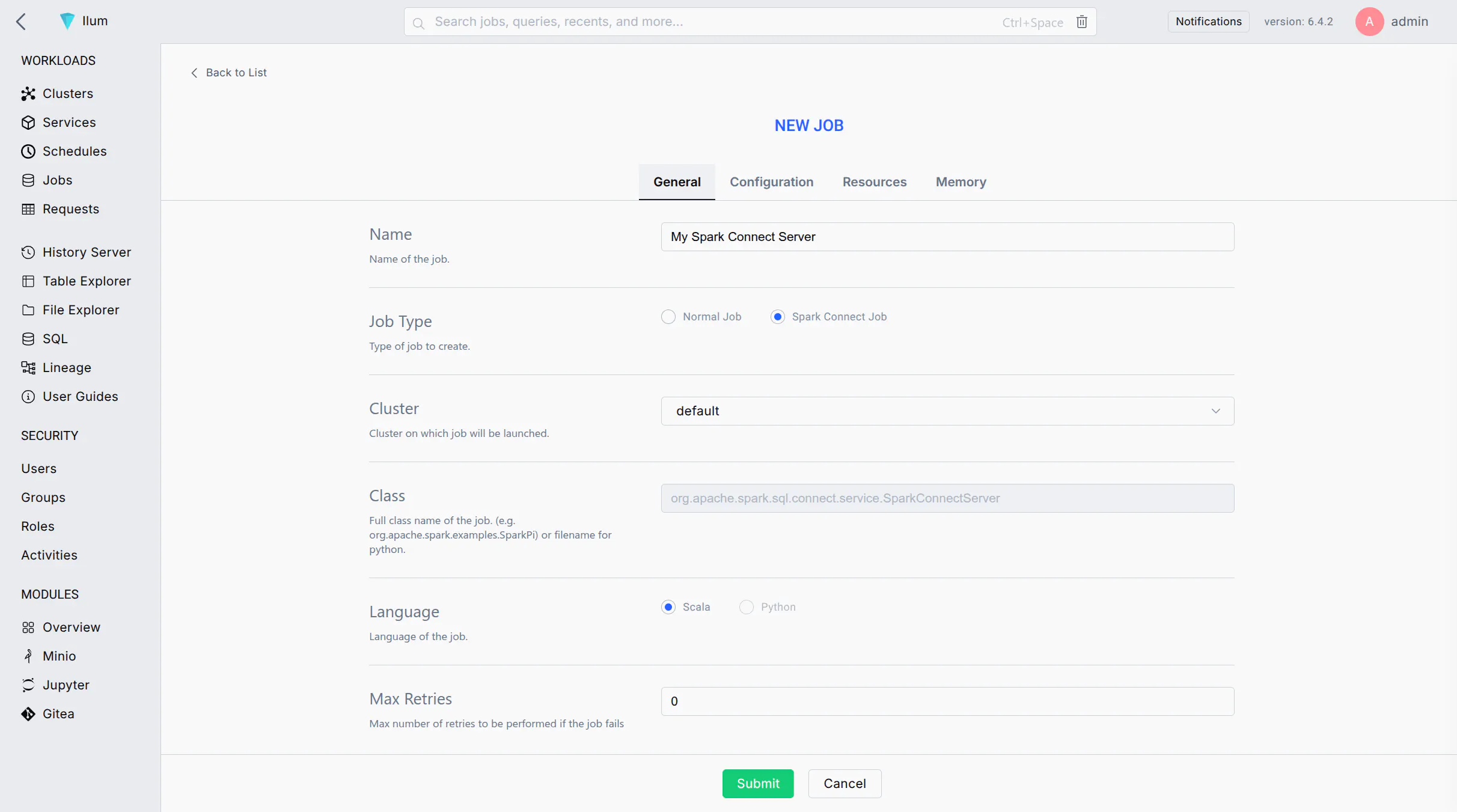
اتبع هذه الخطوات لتشغيل خادم Spark Connect كوظيفة على نظام مجموعة Ilum الخاص بك باستخدام واجهة مستخدم الويب:
-
Start a New Spark Job: Log in to the Ilum UI and navigate to the Jobs section. Click on وظيفة جديدة لإنشاء وظيفة Spark جديدة.
-
Job Name: Enter a recognizable name for the job (e.g.,
خادم Spark Connect) لتحديده لاحقا في واجهة المستخدم. -
Main Class: Set the job's main class to:
org.apache.spark.sql.connect.service.SparkConnectServerThis is the built-in Spark class that starts the Spark Connect server process, enabling remote connectivity to Spark clusters.
-
Spark Configuration: Go to the Configuration tab/section for the job. Add the following Spark property to ensure the Spark Connect server code is available:
- Spark 4 (default)
- Spark 3
Key: spark.jars.packages
قيمة: org.apache.spark:spark-connect_2.13:4.0.1
Key: spark.jars.packages
قيمة: org.apache.spark:spark-connect_2.12:3.5.8
This configuration instructs Spark to fetch the Spark Connect library from Maven when the job starts.
-
(Optional) Label the Pod: If you plan to expose this Spark Connect server via a Kubernetes Service, add a label to the Spark driver pod:
- Key:
spark.kubernetes.driver.label.type - قيمة:
سبارك كونيكت
This will tag the Spark Connect server's pod with a label
النوع = sparkconnectfor easy service selection. - Key:
-
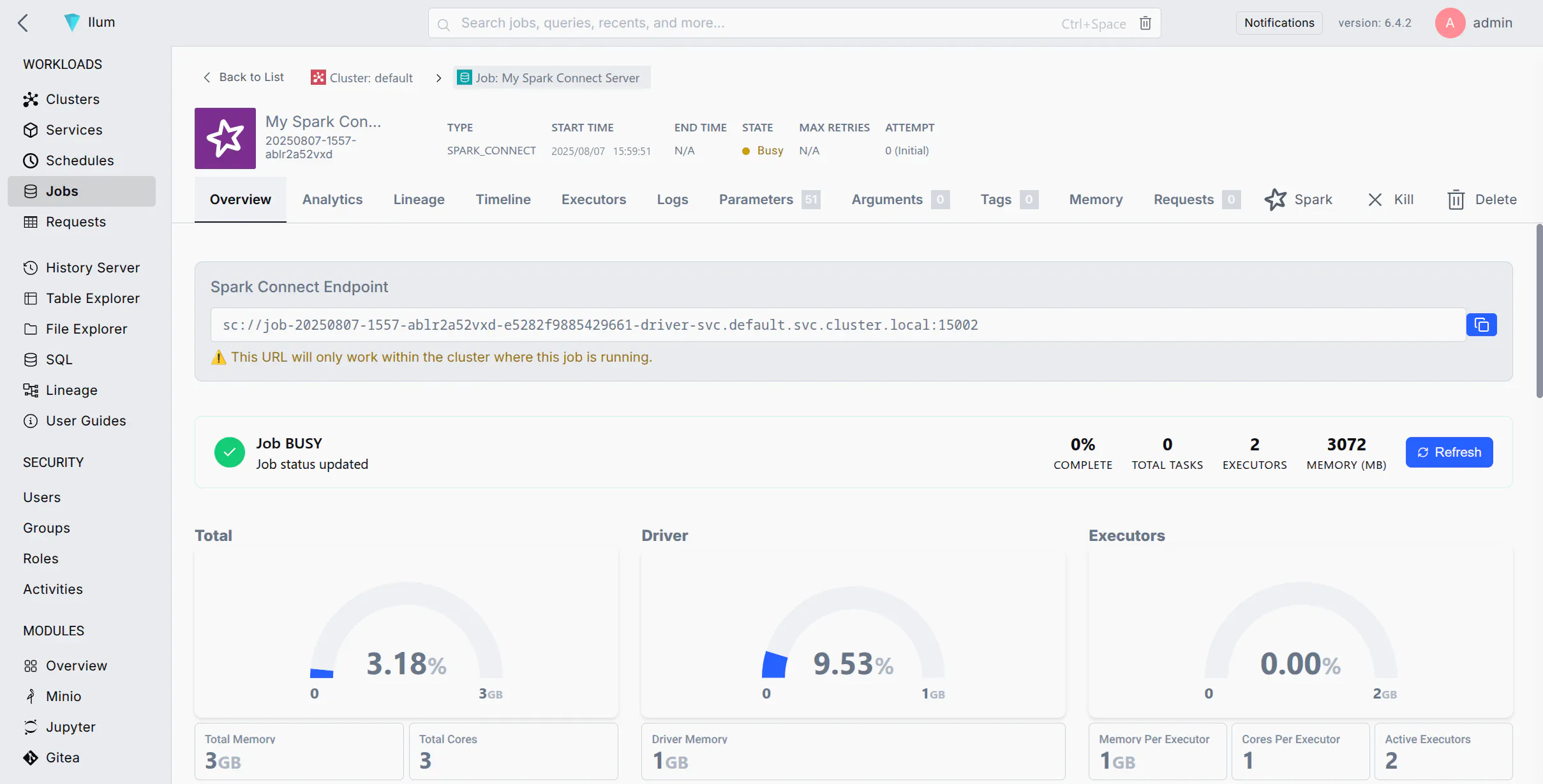
Submit the Job: Click إرسال. سيقوم Ilum بنشر وظيفة Spark إلى نظام المجموعة. بعد وقت قصير ، يجب أن ترى الوظيفة في قائمة الوظائف قيد التشغيل.
-
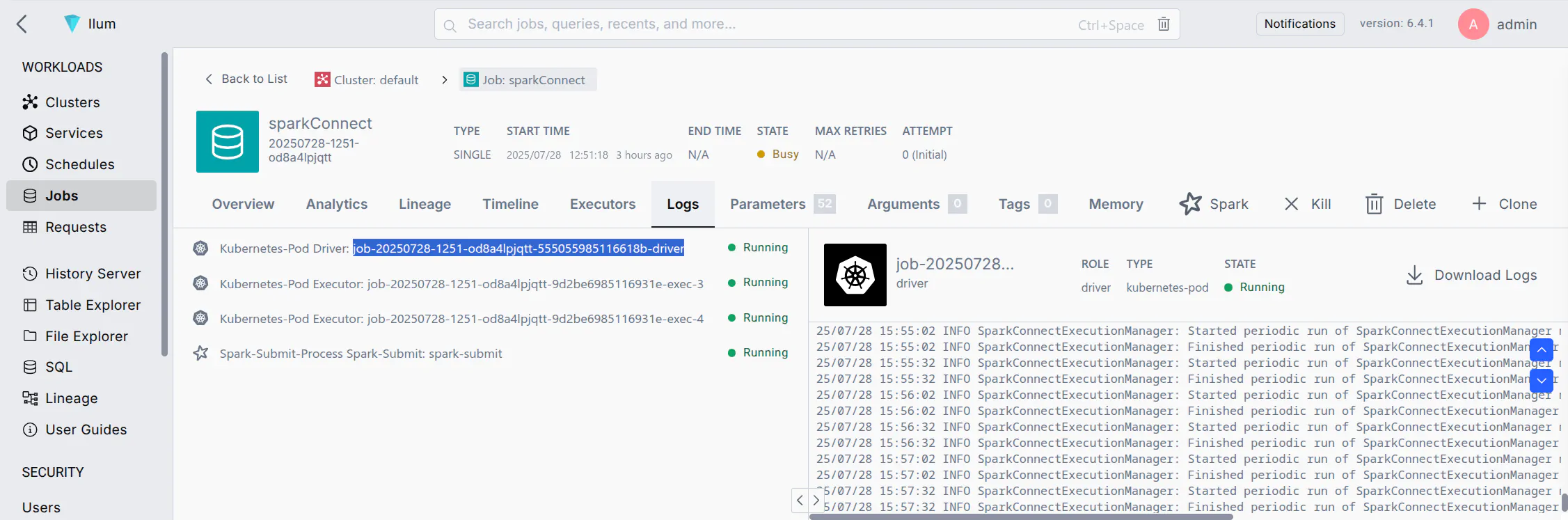
Verify the Server is Running: Wait for the job status to become "Running". You can check the job's logs for a message indicating Spark Connect has started (e.g., a log line mentioning port 15002). Once running, the Spark Connect server is listening for client connections on the default port 15002.
If your job fails immediately, ensure you added spark.jars.packages with the correct version.
الاتصال بخادم Spark Connect
بمجرد تشغيل خادم Spark Connect ، يمكنك الاتصال به من عميل Spark (على سبيل المثال ، PySpark ، Spark shell ، sparklyr ، إلخ) باستخدام عنوان URL ل Spark Connect (sc://...). فيما يلي طرق اتصال مختلفة وفقا لإعداد الشبكة:
- الطريقة 1: الاتصال عن طريق اسم الجراب (نظام أسماء النطاقات لنظام المجموعة)
- الطريقة 2: الاتصال عن طريق Pod IP
- Method 3: Port Forwarding with kubectl
- الطريقة 4: الكشف عن خدمة Spark Connect
If your environment allows DNS resolution of pod names (for example, your client is within the cluster or can resolve the cluster's internal DNS), you can connect using the pod's DNS name. Kubernetes assigns each pod a DNS name of the form <pod-name>. <namespace>.pod.cluster.local (Kubernetes DNS). This DNS name resolves to the pod's IP address inside the cluster.
الخطوات:
- Find the Pod Name: In the Ilum UI, locate the Spark Connect job you started. Note the driver pod name (Ilum may show it in the job details or logs). It will be something like
وظيفة xxxxx-سائق(قد يختلف التنسيق الدقيق). - Construct the URL: Use the pod's fully qualified DNS name. For example, if the pod name is
وظيفة ABC123 سائقفي المربعافتراضيمساحة الاسم، سيكون العنوان:sc://job-abc123-driver.default.pod.cluster.local:15002 - Connect via Spark Client: Use this URL in your SparkSession builder or Spark shell. For example, in PySpark you can do:
notebook.ipynb
من بايسبارك.SQL استورد جلسة سبارك

شراره = جلسة سبارك.builder.بعيد(
    "sc://job-abc123-driver.default.pod.cluster.local:15002"
).getOrCreate()
This will create a Spark session that connects remotely to the Spark Connect server at the given DNS address. Ensure that your environment's DNS can resolve .pod.cluster.local (عادة ما يكون صحيحا فقط في حالة التشغيل داخل نظام المجموعة أو عبر VPN إلى شبكة نظام المجموعة).
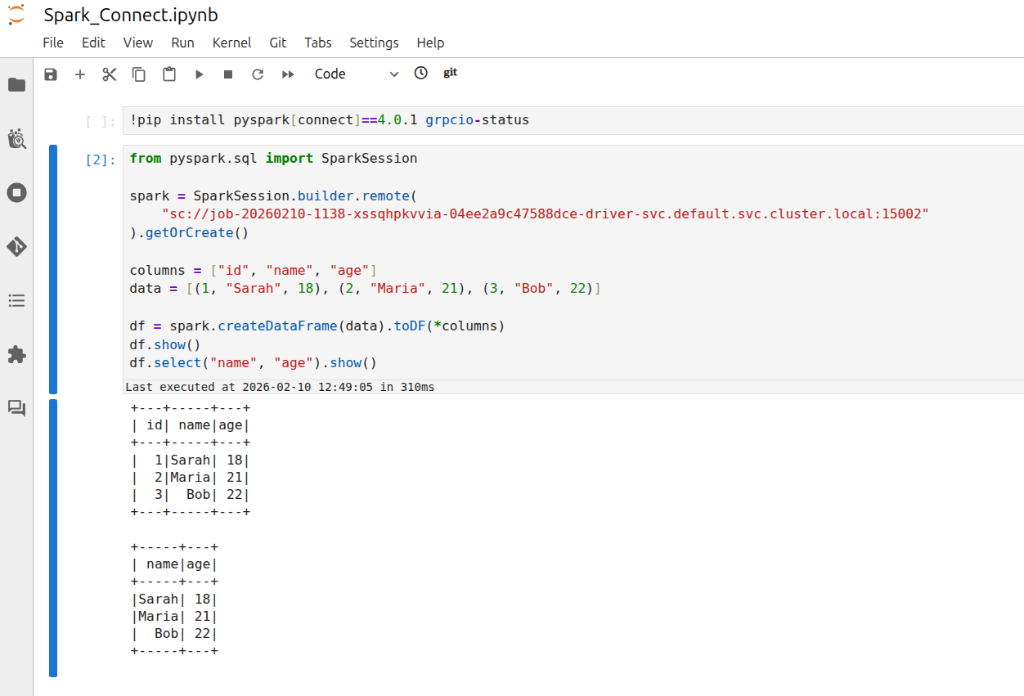
ملاحظه: This is crucial for managing your Apache Spark applications. If your client is running inside the same namespace in the cluster, you might not need the full domain. For instance, just sc://job-abc123-driver:15002 could work due to Kubernetes' DNS search path. However, using the full pod.cluster.local العنوان مع مساحة الاسم هو النهج الأكثر وضوحا وموثوقية.
If DNS resolution is not available, you can use the pod's IP address directly in the Spark Connect URL. This requires that your client environment can reach the pod IP (e.g., if you are on the same network or have appropriate routing to the cluster's pod network).
الخطوات:
- Get the Pod IP: Find the IP address of the Spark Connect pod. In Ilum UI, check the job details for an IP, or use the CLI:
kubectl الحصول على pod <pod-name> -o واسعto see the pod's IP. - Construct the URL: Use the IP in place of the host. For example, if the pod IP is
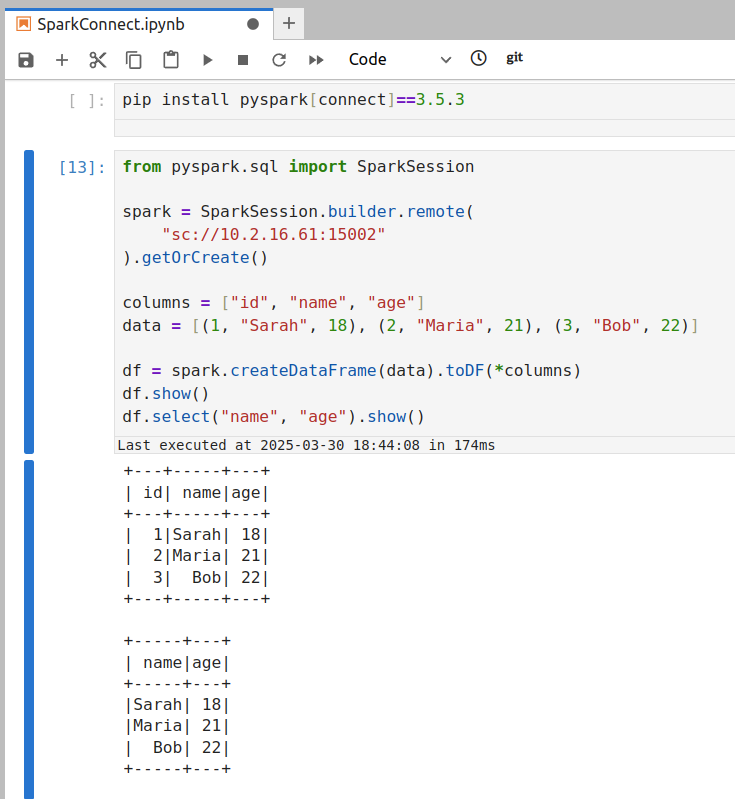
10.42.1.25، سيكون عنوان URL:sc://10.42.1.25:15002 - Connect via Spark Client: Use the IP-based URL in your Spark client. For example:
connect_by_ip.py
شراره = جلسة سبارك.builder.بعيد("sc://10.42.1.25:15002").getOrCreate()
سيحاول هذا الاتصال بالمنفذ 15002 على عنوان IP هذا.
تأكد من أن جهازك يمكنه الوصول بالفعل إلى عنوان IP الخاص بخادم Spark.
- إذا كان عميلك داخل نظام المجموعة (أو في نفس VPC/الشبكة)، يجب أن يكون عنوان IP للجراب قابلا للوصول.
- إذا كان عميلك خارج نظام المجموعة (e.g., your local laptop), the pod IP is likely not directly routable. In that case, this method will time out or refuse connection. You'd then need to use Method 3 or 4 instead.
If you are connecting from outside the cluster (for example, from your local development environment) and cannot reach the pod IP or DNS directly, a convenient approach is to use Kubernetes port forwarding. Port forwarding opens a tunnel from your local machine to the remote pod's port.
الخطوات:
- Run Port-Forward: Open a terminal on your machine that has access to the Kubernetes cluster (where
كوبيكتلتم تكوينه). ركض:استبدلPort Forwardkubectl ميناء إلى الأمام <pod-name> 15002:15002<pod-name>with the Spark Connect pod's name (e.g.,وظيفة ABC123 سائق). This command will bind your local port 15002 to the pod's port 15002. You should see output likeإعادة التوجيه من 127.0.0.1:15002 إلى > 15002. استمر في تشغيل هذه العملية أثناء الحاجة إلى الاتصال بخادم Spark.
-
Connect to Localhost: With the port-forward in place, your local machine is now listening on port 15002. In your Spark client, connect to
المضيف المحلي:15002باستخدام عنوان URL ل Spark Connect:local_script.pyشراره = جلسة سبارك.builder.بعيد("sc://localhost:15002").getOrCreate()يستخدم Spark Connect المنفذ 15002 افتراضيا (Quickstart: Spark Connect — PySpark 3.5 documentation)، لذلك يسمح بالاتصال عن بعد لإثارة المجموعات.
sc://localhost:15002سيصل عبر النفق إلى المجموعة. الآن يتم توصيل جلسة Spark الخاصة بك عن بعد بمثيل Spark لنظام المجموعة. -
Use Spark as Usual: Once connected, you can use the
شرارهsession as if it were local—all DataFrame operations will execute on the cluster.
غالبا ما تكون هذه الطريقة هي الأبسط للتنمية. عند الانتهاء ، يمكنك إيقاف إعادة توجيه المنفذ بالضغط على Ctrl + C في المحطة التي تقوم بتشغيل kubectl ميناء إلى الأمام أمر.
للحصول على حل أكثر ديمومة أو للسماح للعديد من المستخدمين/العملاء بالاتصال بسهولة، يمكنك عرض خادم Spark Connect عبر خدمة Kubernetes. توفر الخدمة نقطة نهاية شبكة مستقرة (اسم DNS وعنوان IP) لجراب Spark Connect، ويمكنها اختياريا عرضها خارج نظام المجموعة (على سبيل المثال، عبر LoadBalancer أو NodePort).
خطوات الكشف عن طريق الخدمة:
-
Ensure Pod Label: If you haven't already labeled the Spark Connect pod (as suggested in step 5 of the setup above), do so now. You can add a label on the fly with kubectl:
kubectl label pod <pod-name> نوع=سبارك كونيكت(إذا تم تسمية الجراب بالفعل عبر تكوين Spark، فلن تكون هناك حاجة إلى هذه الخطوة.)
-
Create a Service: Define a Kubernetes Service YAML that targets this pod by its label.
spark-connect-service.yamlapiVersion: الإصدار 1
نوع: خدمة
البيانات الوصفية:
اسم: شراره-connect-خدمة
Namespace: إيلوم # use the namespace where your Spark Connect pod is running
المواصفات:
محدد:
نوع: سبارك كونيكت # this label should match the pod's label
الموانئ:
- اسم: سبارك كونيكت
بروتوكول: TCP
ميناء: 15002 # service port (clients will use this)
targetPort: 15002 # target port on the pod
nodePort: 30002 # node port (external users will use this nodeip:30002)
نوع: NodePort # ClusterIP is only accessible within the cluster
# للوصول الخارجي ، يمكنك استخدام النوع: NodePort أو LoadBalancer هنا.kubectl apply -و spark-connect-service.yamlستقوم هذه الخدمة بتوجيه حركة المرور إلى أي جراب باستخدام
النوع: SparkConnectlabel on port 15002. You can verify withاحصل على خدمة SVC Spark Connect.
-
Inside Cluster or VPN: Use the service's DNS name or cluster IP. For example, within the cluster (or on a VPN that can resolve cluster DNS), the URL would be:
sc://spark-connect-service.default.svc.cluster.local:15002أوsc://spark-connect-service:15002ستتم إعادة توجيه جميع حركة المرور إلى هذا العنوان إلى جراب Spark Connect. -
Outside Cluster (if exposed): If you set the Service type to NodePort or LoadBalancer, use the external address. For NodePort, that might be
sc://<node-ip>:30002. بالنسبة إلى LoadBalancer ، يمكن أن يكونsc://<load-balancer-host>:15002اعتمادا على كيفية تعيين موفر خدمة السحابة الخاص بك. (هذه سيناريوهات متقدمة؛ غالبا ما تكون إعادة توجيه المنفذ أبسط للوصول الخارجي.)
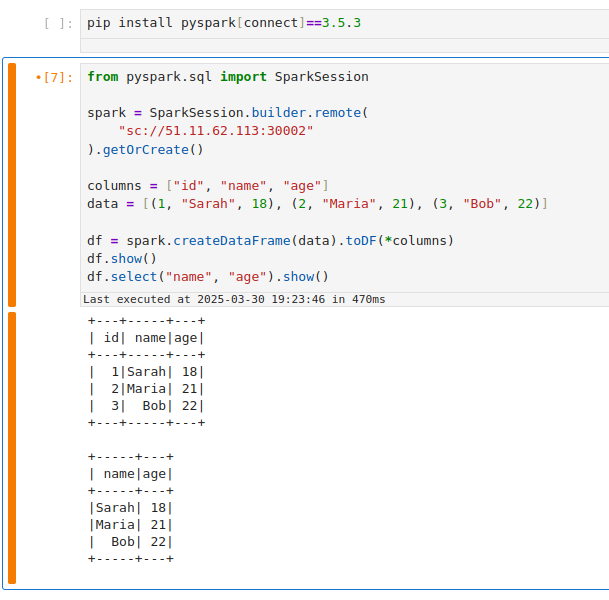
Using a Service has the benefit of a stable name – you don't need to know the exact pod name or IP after it's set up. It also allows you to change the backing pod (e.g., restart the Spark Connect job) without changing how clients connect (as long as the new pod has the same label).
If your Service selector matches multiple Spark Connect pods, client requests can be routed inconsistently. A Kubernetes Service will load-balance connections among all matching pods. This means if you accidentally run two Spark Connect jobs with the label النوع = sparkconnect, a client might connect to either one (potentially different sessions each time). To avoid issues, ensure only one Spark Connect pod is behind a given Service, or use unique labels (and Service names) per instance. In cases where you need to scale Spark Connect horizontally, be aware that each client session is bound to a single server; multiple servers won't share session state.
مهام التنظيف
بعد الانتهاء من جلسة (جلسات) Spark Connect، قم بتنفيذ خطوات التنظيف التالية لتحرير الموارد وتجنب الاتصالات المعزولة:
-
Stop the Spark Connect Job: In the Ilum UI, navigate to the running Spark Connect job and click وقف أو أنهى. This will shut down the Spark Connect server process on the cluster. Confirm that the job's status changes to stopped/finished. (If you forget this step, the Spark Connect server will keep running and occupying cluster resources, impacting your spark application performance.)
-
Terminate Port-Forward Sessions: If you used
kubectl ميناء إلى الأمام, go to the terminal where it's running and pressCtrl + Cلإنهاء إعادة توجيه المنفذ. يؤدي هذا إلى إغلاق النفق وتحرير المنفذ المحلي. إذا قمت بتشغيل المنفذ إلى الأمام في الخلفية ، فتأكد من قتل هذه العملية. -
Delete Kubernetes Service (if created): If you exposed a Service for Spark Connect, remove it when it's no longer needed. You can delete it with:
kubectl delete خدمة خدمة Spark-Connect -ن افتراضياستبدل
خدمة Spark-Connectand namespace as appropriate. This ensures you don't leave an open network endpoint in the cluster. (If you set up a LoadBalancer, deleting the Service will also release the external IP/port. If you used a NodePort, it frees that port on the nodes for other uses.)
من خلال التنظيف، فإنك تضمن عدم ترك أي عمليات أو منافذ شاردة مفتوحة فيما يتعلق باستخدام Spark Connect، مما يؤدي إلى تحسين الموارد الموجودة على مجموعة Spark الخاصة بك.
Troubleshooting Spark Connect Issues
Here are solutions to the most common errors when connecting to Spark on Kubernetes.
How to fix "Connection Refused" on port 15002?
If your client fails with ConnectionRefusedError أو UNAVAILABLE:
Cause: The client cannot reach the Spark Driver pod. This is usually a networking issue, not a Spark issue.
حل:
- Check Job Status: Is the job actually
RUNNINGفي المربع واجهة مستخدم Ilum? - Check Network Access:
- If you are outside the cluster (e.g., local laptop), you cannot use the Pod IP directly. You must use
kubectl ميناء إلى الأمام(Method 3) or a NodePort/LoadBalancer Service (Method 4).
- If you are outside the cluster (e.g., local laptop), you cannot use the Pod IP directly. You must use
- Verify Port: Ensure you are connecting to
15002(Spark Connect), not4040(Spark UI). - Test Connection: Run
nc -vz localhost 15002(if using port-forward).
How to resolve "Name or service not known" (DNS Error)?
Cause: Your local machine doesn't know how to resolve Kubernetes internal DNS names like job-xyz.default.pod.cluster.local.
حل:
- Option A:استخدام
kubectl ميناء إلى الأمامand connect tosc://localhost:15002. - Option B: Connect using the Pod IP directly (only works if you are on the same VPN/VPC).
- Option C: Configure your local
/etc/hoststo point the DNS name to 127.0.0.1 (combined with port forwarding).
How to fix "Pod not found" during port-forwarding?
Cause: Spark Driver pods are ephemeral. If you restart the job, the pod name changes (e.g., from job-abc-driver ل job-xyz-driver).
حل:
- Always check the current driver pod name in the Ilum UI or via
kubectl get pods -l spark-role=driver. - استخدم خدمة (Method 4) to get a stable hostname that doesn't change between restarts.
Error: "Client version mismatch" or "Unsupported Protocol"
Cause: You are trying to connect a Spark 3.4 client to a Spark 3.5 server (or vice versa).
حل: Check your client version:
pip show pyspark
It must match the Ilum cluster version (e.g., both must be 3.5.x).
Error: "ModuleNotFoundError: No module named 'grpc'"
Cause: The grpcio-status library is missing. It is a required optional dependency for Spark Connect.
حل:
pip install grpcio-status
باتباع هذا الدليل ، يجب أن تكون قادرا على تكوين خادم Spark Connect على Ilum والاتصال به من خلال طرق مختلفة. تسهل واجهة مستخدم Ilum نشر مثيل Spark Connect، وباستخدام التقنيات المذكورة أعلاه، يمكنك الوصول إليه سواء كنت داخل مجموعة Kubernetes أو تعمل عن بعد. تواصل سعيد!