Running Spark Jobs in Different Namespaces
This guide explains how to configure Ilum to run Spark jobs in namespaces different from the default application deployment namespace. By default, Ilum creates a default cluster that runs jobs within the same namespace as the Ilum deployment, but you can modify Helm values to enable job execution in arbitrary namespaces.
To run Spark jobs in a separate namespace with Ilum:
- Upgrade Helm مع
upgradeClusterOnStartup=true. - Configure FQDNs for services (e.g.,
ilum-minio.ilum-namespace). - Update Cluster Config in the UI to point to the new namespace.
Why Run Spark Jobs in Different Namespaces?
By default, Ilum:
- Creates a default Kubernetes cluster for running Spark jobs.
- Deploys all Spark resources (drivers, executors, ConfigMaps) in the same namespace as the Ilum installation (
{{ . Release.Namespace }}).
However, there are scenarios where you might want to run Spark jobs in different namespaces:
- Multi-tenancy: Isolating different teams or projects.
- Resource management: Applying different resource quotas and limits per namespace.
- أمن: Implementing namespace-level RBAC policies.
- Compliance: Meeting organizational namespace separation requirements.
Key Configuration Parameters
The primary Helm values that control namespace behavior are:
| Parameter | وصف | Default Value |
|---|---|---|
IMMUTABLE ENVIRONMENT VARIABLE | Namespace where Spark resources are deployed | {{ . Release.Namespace }} |
kubernetes.initClusterOnStartup | Initialize default cluster on startup | صحيح |
kubernetes.upgradeClusterOnStartup | Upgrade cluster configuration from Helm values | خطأ |
How to Configure Spark for Multiple Namespaces
To enable Spark jobs to run in a different namespace, follow these configuration steps:
- 1. Helm Configuration
- 2. UI Configuration
Update your Helm release to enable cluster upgrades and configure service URLs to point to the correct namespace (using FQDNs).
ترقية Helm ilum ILUM / ILUM \
  --جبر ilum-core.kubernetes.upgradeClusterOnStartup=صحيح \
  --جبر ilum-core.kubernetes.s3.host=ilum-minio.{ILUM_DEPLOYMENT_NAMESPACE} \
  --جبر ilum-core.job.openLineage.transport.serverUrl="http://ilum-marquez.{ILUM_DEPLOYMENT_NAMESPACE}:9555" \
  --جبر ilum-core.metastore.hive.address="thrift://ilum-hive-metastore.{ILUM_DEPLOYMENT_NAMESPACE}:9083" \
  --جبر ilum-core.historyServer.address="http://ilum-history-server.{ILUM_DEPLOYMENT_NAMESPACE}:9666" \
  --جبر ilum-core.grpc.job.host="ilum-grpc.{ILUM_DEPLOYMENT_NAMESPACE}" \
  --إعادة استخدام القيم
When running jobs in a different namespace, short DNS names (like ilum-minio) won't resolve. You must use the fully qualified domain name (e.g., ilum-minio.ilum-namespace).
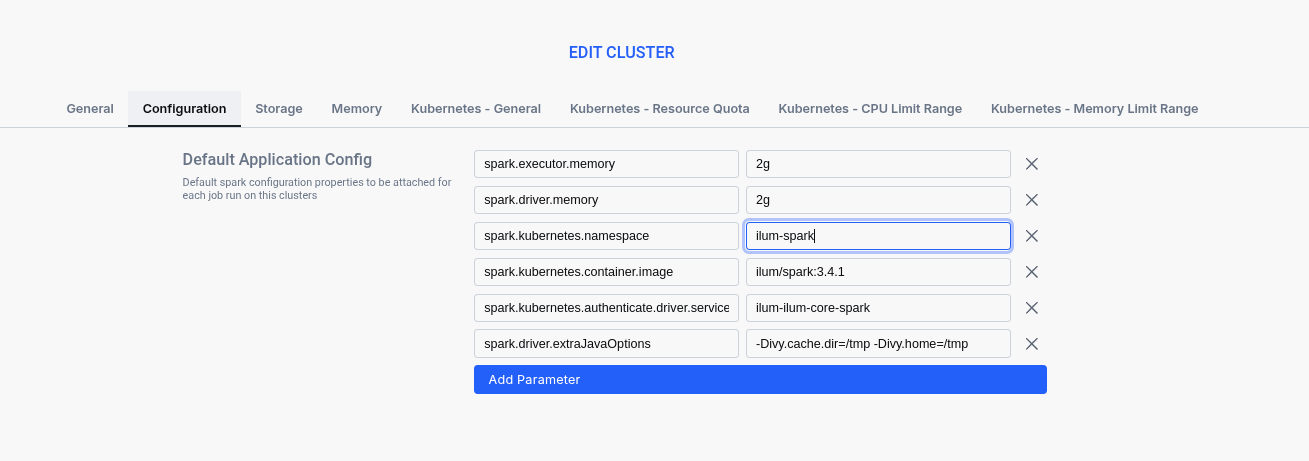
After updating Helm, you must update the default cluster configuration in the Ilum UI to point to the new namespace.
- الانتقال إلى العناقيد.
- Edit your Default Cluster.
- Change the Namespace field to your target namespace.
Namespace Creation and Management
Depending on your security policies, you can rely on Ilum to automatically create namespaces or create them manually.
- Method A: Automatic Creation (Standard RBAC)
- Method B: Manual Creation (Restricted RBAC)
If your Ilum installation uses standard RBAC permissions (ClusterRole), Ilum can automatically handle namespace creation for you.
- How it works: When you submit a job to a cluster configured with a non-existent namespace, Ilum attempts to create that namespace on the fly.
- Requirements: ال
إيلوم كورServiceAccount must havecreateأذوناتnamespacesat the cluster level. - Pros: Simplifies operations; no manual Kubernetes intervention needed.
- Cons: Requires broader permissions.
If you are running Ilum with restricted RBAC (where the core service account cannot create namespaces), you must create the namespace and resources manually before running any jobs.
If ilum-core.rbac.restricted=true is set in Helm, automatic namespace creation will fail. You must use this manual method.
Steps for Manual Setup
-
Create the target namespace:
Create Namespacekubectl create namespace spark-jobs -
Create Spark-related RBAC resources: Spark drivers need permissions to create executors in the new namespace. Apply the following manifest (replace
<target-namespace>):spark-rbac.yamlapiVersion: الإصدار 1
نوع: ServiceAccount
البيانات الوصفية:
اسم: شراره
Namespace: <target-Namespace>
---
apiVersion: rbac.authorization.k8s.io/v1
نوع: Role
البيانات الوصفية:
اسم: شراره-role
Namespace: <target-Namespace>
rules:
- apiGroups: [""]
موارد: ["pods", "services", "configmaps", "persistentvolumeclaims"]
verbs: ["create", "get", "قائمة", "watch", "delete"]
---
apiVersion: rbac.authorization.k8s.io/v1
نوع: RoleBinding
البيانات الوصفية:
اسم: شراره-role-الربط
Namespace: <target-Namespace>
المواضيع:
- نوع: ServiceAccount
اسم: شراره
Namespace: <target-Namespace>
roleRef:
نوع: Role
اسم: شراره-role
apiGroup: rbac.authorization.k8s.io -
Configure your default cluster in Ilum UI to use this namespace and Service Account:
- الانتقال إلى العناقيد.
- Edit your Default Cluster.
- Change the Namespace field to your target namespace (e.g.,
spark-jobs). - Change the حساب الخدمة ل
شراره.
Frequently Asked Questions (FAQ) & Troubleshooting
1. Why do my jobs fail to start in the target namespace?
Symptoms: Spark jobs fail with permission errors or "namespace not found" errors.
Solutions:
- Verify the namespace exists:
kubectl get namespace <namespace-name> - Check RBAC permissions for the Ilum service account
- Ensure
kubernetes.upgradeClusterOnStartup=trueis set
2. Why can't my jobs access storage buckets (S3/MinIO)?
Symptoms: Jobs fail with storage access errors or "bucket not found" errors.
Solutions:
- Verify storage configuration parameters are correct
- Check that storage buckets/containers exist and are accessible
- Ensure storage credentials are properly configured
3. What happens if I exceed the namespace resource quota?
Symptoms: Jobs fail with "exceeded quota" errors.
Solutions:
- Check namespace resource quotas:
kubectl describe quota -n <namespace> - Adjust resource requests in job configurations
- Increase namespace resource limits if needed
4. Why are jobs still running in the default namespace after configuration?
Symptoms: Jobs still run in the default namespace despite configuration changes.
Solutions:
-
Ensure
kubernetes.upgradeClusterOnStartup=trueis set -
Restart Ilum core pods to apply configuration changes:
Rollout Restartkubectl rollout restart deployment/ilum-core -
Verify configuration in Ilum UI under Clusters section
5. How do I fix network timeouts between namespaces?
Symptoms: Jobs fail with network timeouts or connection refused errors.
Solutions:
- Verify network policies allow communication between namespaces
- Check service discovery and DNS resolution
- Ensure required services are accessible from the target namespace
Verification Commands
Use these commands to verify your configuration:
# Check if namespace exists
kubectl get namespace <target-namespace>

# Verify RBAC permissions
kubectl auth can-i create pods --namespace=<target-namespace> --as=system:serviceaccount:<ilum-namespace>:ilum-core

# Check resource quotas and limits
kubectl describe quota -ن <target-namespace>
kubectl describe limitrange -ن <target-namespace>

# Monitor job creation
kubectl الحصول على القرون -ن <target-namespace> -w

# Check Ilum core logs
kubectl logs -و deployment/ilum-core -ن <ilum-namespace>
أفضل الممارسات
- Namespace Naming: Use descriptive names that reflect the purpose (e.g.,
spark-production,spark-dev,team-alpha-spark) - Resource Planning: Set appropriate resource quotas and limits based on expected workload
- أمن: Implement proper RBAC policies and network policies for namespace isolation
- رصد: Set up monitoring and alerting for namespace-specific metrics
- توثيق: Document namespace purposes and configurations for team reference
- اختبار: Test namespace configurations in development environments before applying to production
Related Configuration
For additional configuration options, refer to:
- Ilum Core Configuration - Complete Helm values reference
- التحكم في الموارد - Kubernetes resource management
- Production Deployment - Production environment setup
- أمن - Security and authentication
This configuration enables flexible namespace management while maintaining the full functionality of Ilum's Spark job execution capabilities.