Run Interactive Spark Job Service on Kubernetes
ال Job Type Service in Ilum is designed for scalable batch processing and production data pipelines on Kubernetes. Unlike Code type services that maintain persistent sessions, Job type services execute predefined artifacts (JARs or Python scripts) in isolated runs. This ensures complete repeatability and a clean state for each execution—making them ideal for scheduled transformations, automated ETL pipelines, and reliable production workloads.
You can use the Python example script from this Python Spark Job Example.
Interactive Demo
Service Creation Methods
- واجهة مستخدم Ilum
- واجهة برمجة تطبيقات REST
Step-by-Step Guide: How to Run a Spark Job Service
Here is a step-by-step tutorial to setting up an interactive Spark job service using the Ilum UI. This guide covers configuration, resource allocation, and job execution.
-
Navigate to Services: Access the 'Services' section in your Ilum dashboard.
-
Create New Service: Click the "New Service +" button to start setting up your interactive service environment.
-
Configure General Settings:
- اسم: Enter a unique name for your service (e.g.,
MyJobService) - عنقود: Select the Kubernetes cluster where you want to deploy the service.
- نوع: Select
مهمةfor batch processing with isolated executions. - اللغة: Choose
بايثون(or Scala/Java).
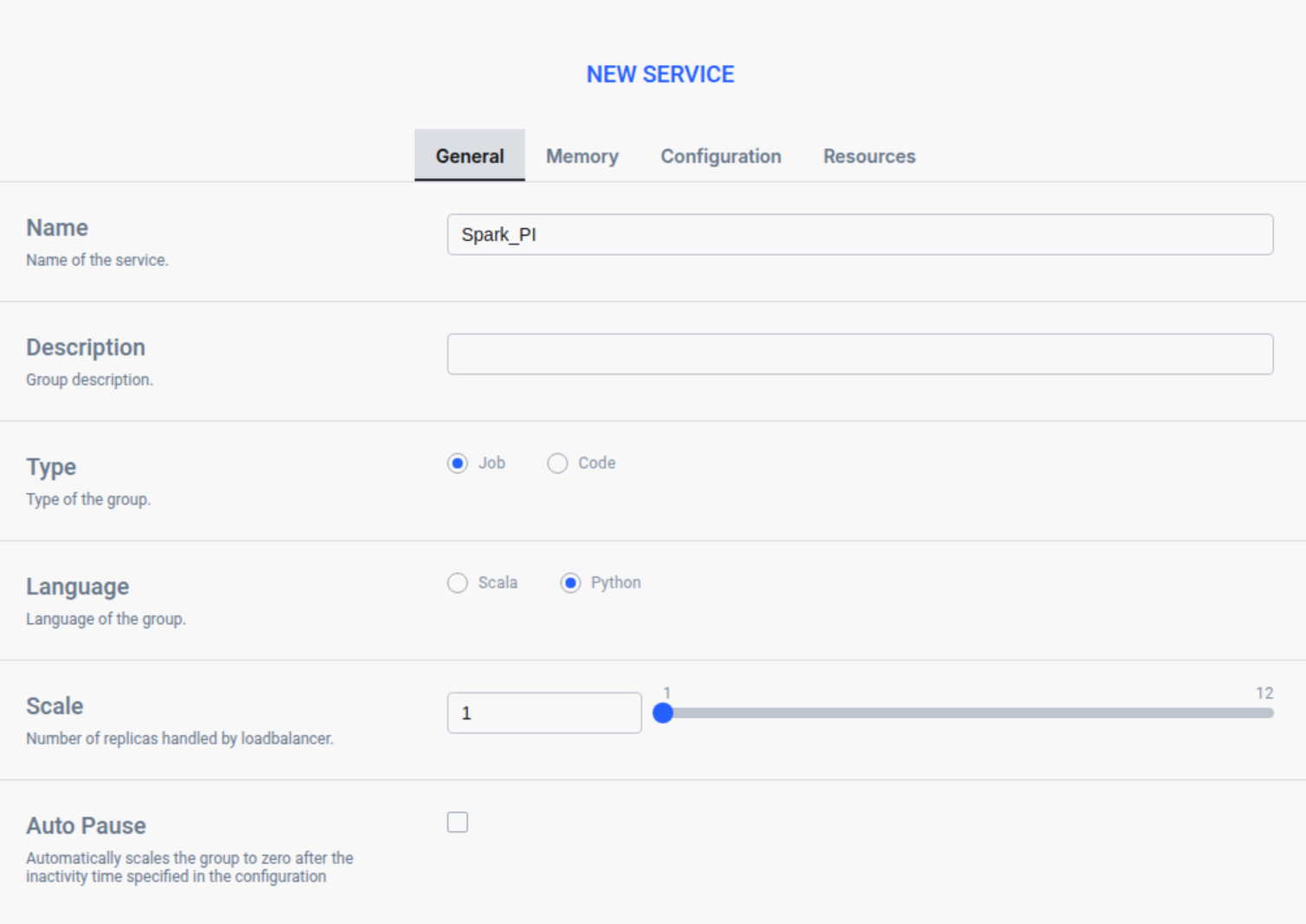
- اسم: Enter a unique name for your service (e.g.,
-
Configure Resources:
- انتقل إلى الزر موارد التبويب.
- Add Python Script: In the PyFiles section, click "Click To Upload" and select your Python script ملف.
- Requirement: The script must contain a class that extends
Ilum Jobwith aركضmethod acceptingشرارهوالتكوينparameters.
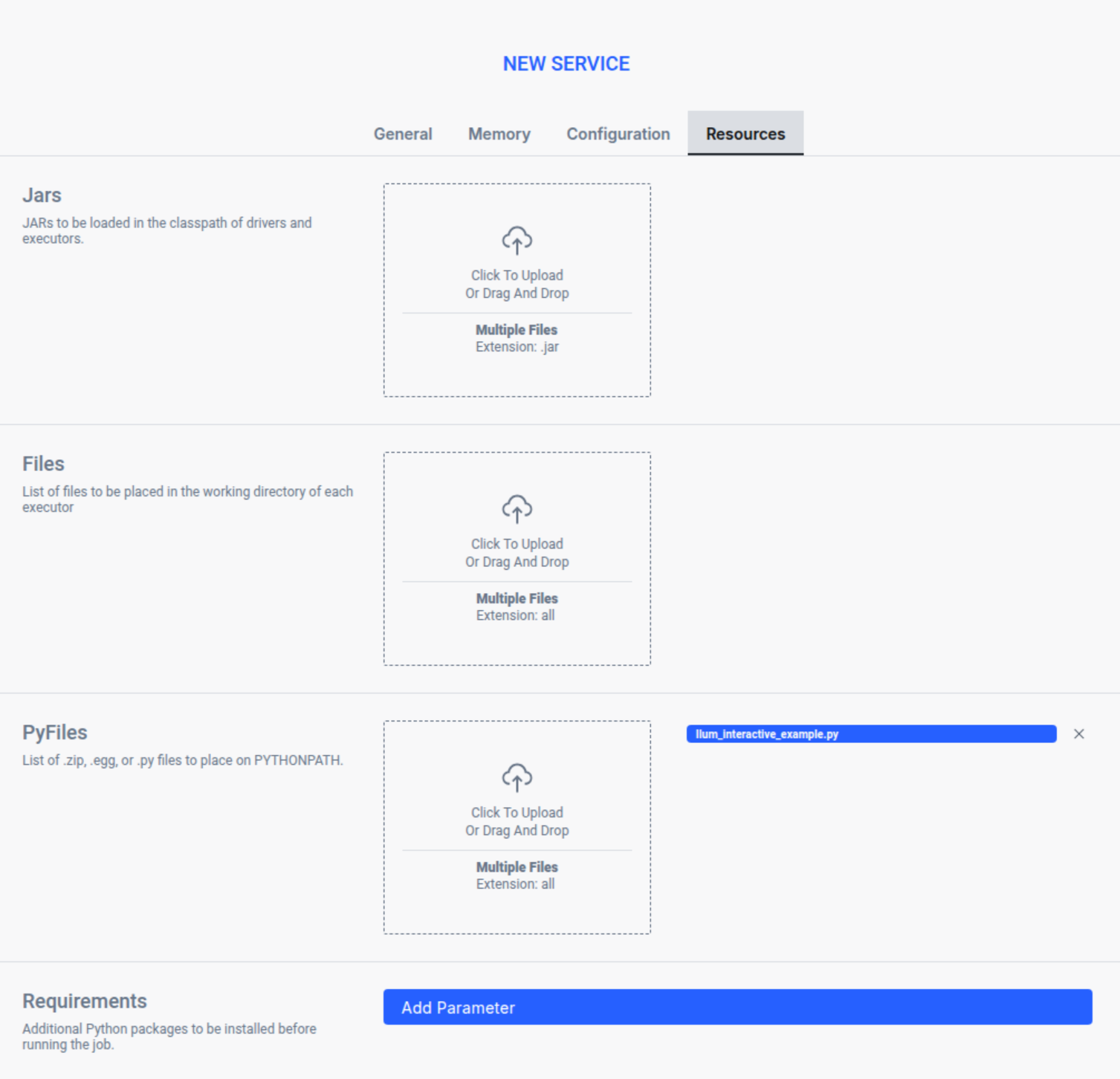
All configuration options are explained in detail in the Service Configuration Reference section below.
-
Activate the Service: Submit the form to deploy the service.
-
Verify Deployment: Once activated, locate your service in the Services list. Wait for the status to change from "Starting" to "Running", then click on the service to view its dashboard.
Creating Job Services via API
You can create Job services programmatically via the Ilum API, enabling automation through scripts, CI/CD pipelines, or orchestration tools.
Before creating services via API, you need to expose the Ilum Core API. See Accessing the API for instructions on port forwarding, NodePort, or Ingress setup.
Create Job Service
To create a Job type service, use the /api/v1/group endpoint with بيانات متعددة الأجزاء / النماذج:
حليقه -X منصب 'http://localhost:9888/api/v1/group' \
  --form 'name="MyJobService"' \
  --form 'pyFiles=@"Ilum_interactive_spark_pi.py"' \
  --form 'clusterName="default"' \
  --form 'language="PYTHON"' \
  --form 'scale="1"'
Response:
{
  "معرف المجموعة": "20251222-1208-e0z6b"
}
مهم: Save the معرف المجموعة value - you'll need it for job execution and status checks!
API Creation Fields
| Field | Required | نوع | وصف |
|---|---|---|---|
اسم | نعم | خيط | Unique name for the service |
clusterName | نعم | خيط | Target cluster (usually "default") |
اللغة | نعم | خيط | PYTHON أو SCALA |
مِيزَان | لا | number | Number of replicas (default: 1) |
pyFiles | Python only | ملف | Python script file(s) with your job code |
الجرار | Scala/Java only | ملف | JAR file(s) with your job code |
الملفات | لا | ملف | Additional files to include |
كونف | لا | JSON | Spark configuration as key-value pairs |
Verify Service Creation
After creating the service, verify it's running:
حليقه http://localhost:9888/api/v1/group
Wait for service حالة to be ACTIVE and job حالة to be READY before executing jobs. This typically takes 10-15 seconds after creation.
Execution Methods
- واجهة مستخدم Ilum
- واجهة برمجة تطبيقات REST
-
Execute the Spark Job:
- Class Name: Enter the fully qualified class name:
Ilum_interactive_spark_pi. SparkPiInteractiveExample. - البارامترات: Provide job parameters in JSON format (e.g.,
{"partitions": "5"}).
 معلومات
Unlike Code type services, each execution triggers a fresh, isolated run of your job on the cluster.
- Class Name: Enter the fully qualified class name:
-
Run and Optimize:
- نقر أعدم. The first run may experience a "cold start" delay as resources are allocated.
- Subsequent runs will benefit from caching if resources are kept alive (depending on dynamic allocation settings).
-
Iterate with Parameters:
- Adjust the JSON parameters and re-execute to test different scenarios without redeploying the service.
Before executing jobs via the API, you need to expose the Ilum Core API. See Accessing the API for instructions on port forwarding, NodePort, or Ingress setup.
Execute the job programmatically using the JSON endpoint. Replace {{groupId}} with your service's group ID:
حليقه -X منصب "http://ilum-core:9888/api/v1/group/{{groupId}}/job/execute" \
  -H "Content-Type: application/json" \
  -d '{
    "النوع": "interactive_job_execute",
    "jobClass": "Ilum_interactive_spark_pi.SparkPiInteractiveExample",
    "jobConfig": {
      "partitions": "5"
    }
  }'
| Field | نوع | وصف |
|---|---|---|
نوع | خيط | ضبط على interactive_job_execute. |
فئة الوظيفة | خيط | Fully qualified class name. |
jobConfig | كائن | JSON object containing job parameters. |
- المراقبة والتعديلات:
-
Navigate to the service details to review all requests sent to the service.
-
افحص معلمات ونتائج كل طلب محدد.

-
راقب المخطط الزمني للتنفيذ واستخدام الذاكرة لكل منفذ في قسم المنفذين.
-
تحقق من السجلات للحصول على معلومات التنفيذ التفصيلية.
استنتاج: Congratulations on successfully setting up and running your interactive service in Ilum!
This guide demonstrates the UI workflow for learning and testing purposes. In production environments, job executions are typically automated through the واجهة برمجة تطبيقات Ilum, allowing integration with orchestration tools, schedulers, and CI/CD pipelines. The API provides programmatic access to all service operations shown in this guide.
Frequently Asked Questions (FAQ)
Details
How is the Ilum Job Service different from شرارة تقديم?
Ilum Job Service wraps Spark applications in a managed Kubernetes service. Unlike raw شرارة تقديم, Ilum provides a REST API for execution, automatic resource management, history tracking, and the ability to re-run jobs with different parameters without redeploying artifacts.Details
Can I schedule these interactive jobs?
Yes. Since every job execution is triggered via a REST API call, you can easily integrate Ilum Job Services with orchestrators like Apache Airflow, Dagster, or simple cron jobs to schedule your data pipelines.Details
Does the Job Service maintain state between runs?
No. The Job Service is designed for stateless batch processing. Each execution starts in a clean environment to ensure reproducibility. If you need to share state (e.g., DataFrames) between steps, consider using the Interactive Code Service.For further information or support, reach out to us at [البريد الإلكتروني محمي].
What is a Job Type Service?
A Job type service is designed for batch processing with isolated, repeatable executions. Here's how it works:
- No Persistent Session: You prepare an artifact (JAR or Python script), execution parameters, and Spark configuration. Ilum starts a fresh set of Kubernetes pods (driver + executors) only for the duration of the task.
- Clean State: After completion, everything shuts down, and no state is carried over to subsequent runs. Each execution starts with a clean slate, ensuring full repeatability.
- Cold Start: You accept a cold start with each invocation in exchange for complete isolation and reproducibility.
- Perfect For: Scheduled transformations, large predefined processing tasks, reliable data pipelines that run cyclically without manual supervision, and production ETL workflows.
Understanding Services in Ilum
In Ilum, a خدمة is an abstraction that defines a computational environment—essentially a scalable group of Spark jobs with a shared language (e.g., PySpark or Scala), image or environment with necessary libraries, and Spark configuration (number of executors, memory, cores). Services can optionally include additional files or JARs.
Under the hood, each service consists of Kubernetes pods: one driver pod that manages Spark work, receives code, divides it into tasks, and collects results, plus executor pods that perform computations in parallel. The speed and scale of your work depends on the configured number of pods, memory, and CPU.
Service Types in Ilum
Ilum offers two types of services, each designed for different use cases:
Job Type Service (This Guide)
ال مهمة type is what this guide focuses on—designed for batch processing and production pipelines:
- Isolated Executions: Each run is completely independent, starting fresh and shutting down after completion
- Repeatability: Every execution begins with a clean state, ensuring consistent, reproducible results
- Artifact-Based: You submit complete JARs or Python scripts with all dependencies
- API Operations: Execute synchronously (wait for result) or asynchronously (track with jobInstanceId)
- حالات الاستخدام: Scheduled ETL, data pipelines, batch transformations, production workloads
Code Type Service
ال رمز type provides an interactive REPL environment (covered in the Interactive Code Service guide):
- Persistent Session: Maintains running pods with preserved state between executions
- Stateful: DataFrames, variables, and libraries remain available across requests
- Snippet-Based: Send code fragments on demand via UI or API
- حالات الاستخدام: Exploratory analysis, notebooks (Jupyter/Zeppelin), rapid prototyping
Comparison: Spark Job Service vs. Interactive Code Service
The following table compares the two service types to help you choose the right execution model for your workload.
| الجانب | Job Type (This Guide) | Code Type |
|---|---|---|
| Session Model | Stateless; fresh start for every execution | Persistent session; always running |
| State Retention | Isolated runs; no shared state | Preserves DataFrames, variables, and libraries |
| Startup Latency | Cold start (pod creation) per run | Warm start; immediate execution |
| Ideal Use Case | Batch processing, scheduled ETL, production pipelines | Interactive analysis, notebooks, rapid prototyping |
| Resource Efficiency | Consumes resources only during execution | Continuous consumption (unless paused) |
| Input Method | Pre-compiled artifacts (JAR/Script) | Ad-hoc code snippets |
Use Job Type when:
- You have predefined, repeatable batch processing tasks
- You need complete isolation between runs for reproducibility
- You're running scheduled or automated data pipelines
- You want to minimize resource consumption (only run when needed)
- You need audit trails and reproducible production workflows
Use Code Type when:
- You need to explore data interactively and iterate quickly
- You're developing and testing code in a notebook environment
- You want to maintain context between multiple operations
- You need immediate feedback without cold start delays
Benefits of Job Type Services
Job type services provide key advantages for production data workflows:
-
Complete Isolation and Repeatability:
- Each execution starts with a clean slate, ensuring consistent, reproducible results
- No state leakage between runs eliminates unexpected behavior
- Perfect for production environments requiring audit trails and deterministic outcomes
-
Resource Efficiency:
- Resources are allocated only during job execution, then released
- No idle resource consumption when jobs aren't running
- Cost-effective for scheduled or infrequent workloads
-
Production-Ready Workflows:
- Designed for scheduled transformations and automated pipelines
- Integrates seamlessly with orchestration tools and schedulers
- Reliable execution with comprehensive logging and monitoring
-
قابلية التوسع:
- Easy to run multiple job instances in parallel
- Built-in load distribution across available cluster resources
- Handles large-scale batch processing efficiently
Service Configuration Reference
- General Tab
- Configuration Tab
- Resources Tab
- Memory Tab
General Tab
- اسم: A unique identifier for the interactive service. This name will be used to track the service's status and logs within the Ilum dashboard.
- Cluster: The specific cluster where the service's resources will be allocated. Ensure the selected cluster has sufficient capacity for your interactive session.
- Scale: The number of replicas to launch for this service. Increasing the scale allows for load balancing and higher concurrency if multiple users are accessing the same service.
- Type: The operational mode of the service. Select
مهمةto run a specific job class interactively with isolated executions, orرمزfor an interactive REPL environment with persistent session state.
Configuration Tab
- Parameters: Key-value pairs for configuring Spark properties (e.g.,
spark.executor.memory). These settings override the default cluster configurations for this specific service. - Tags: Custom labels to categorize and filter your services. Tags are useful for organizing resources by project, team, or environment (e.g.,
ديف,تحليلات).
Resources Tab
- Add Job JAR: في المربع الجرار section, upload the main JAR file or script containing the job logic. This code will be loaded and ready for execution within the interactive session.
- Jars: Additional JAR files to be included in the classpath of the driver and executors. These libraries will be available to your job code.
- Files: Auxiliary files to be placed in the working directory of each executor. These can be configuration files or data files needed by your job.
- PyFiles: Python dependencies such as
.zip,.eggأو.pyfiles. These are added to thePYTHONPATHfor Python-based jobs.
Memory Tab
- Executors: The number of executor instances to allocate per replica. More executors allow for greater parallelism during data processing.
- Driver Cores: The number of CPU cores assigned to the driver process. This affects the driver's ability to handle task scheduling and result collection.
- Executor Cores: The number of CPU cores assigned to each executor. This determines how many tasks each executor can run simultaneously.
- Driver Memory: The amount of RAM allocated to the driver (e.g.,
2g). Sufficient memory is crucial for the driver to manage application state and large results. - Executor Memory: The amount of RAM allocated to each executor (e.g.,
4g). This directly impacts the amount of data that can be cached and processed in memory. - Dynamic Allocation: Enables the automatic scaling of the number of executors based on workload. When enabled, Ilum will request more executors when busy and release them when idle.
- Initial Executors: The initial number of executors to start with when dynamic allocation is enabled. This provides a baseline capacity when the service starts.
- Minimal number of executors: The lower bound for the number of executors when dynamic allocation is enabled. The service will never scale below this number.
- Maximal number of executors: The upper bound for the number of executors when dynamic allocation is enabled. This prevents the service from consuming too many cluster resources.