Interactive Spark Code Service on Kubernetes
Running interactive أباتشي سبارك sessions on Kubernetes can be complex. Ilum simplifies this by providing a robust Interactive Code Service for real-time code execution and data analysis.
Designed to facilitate an iterative development workflow, this service maintains a persistent interpreter session (REPL). It empowers data scientists and developers to execute Spark code fragments on-the-fly while retaining context and variables between steps. This is ideal for deep data exploration, rapid prototyping, and integration with notebooks like Jupyter or Zeppelin.
الدليل التفاعلي
Creating Interactive Spark Services
You can create interactive Spark sessions through the Ilum UI or programmatically via REST API.
- واجهة مستخدم Ilum
- واجهة برمجة تطبيقات REST
Step-by-Step Guide: Setting Up an Interactive Spark Session
Here's a guide to launching an interactive Spark environment using the Ilum dashboard.
-
Navigate to Services: Access the 'Services' section in your Ilum dashboard.
-
Create New Service: Click the "New Service +" button to start setting up your interactive service environment.
-
Configure General Settings:
- اسم: Enter a unique name for your service (e.g.,
MyCodeService) - عنقود: Select the Kubernetes cluster where you wish to run your interactive service.
- نوع: Select
رمزto initialize the interactive REPL environment. - اللغة: Choose
سكالاأوبايثون(PySpark).
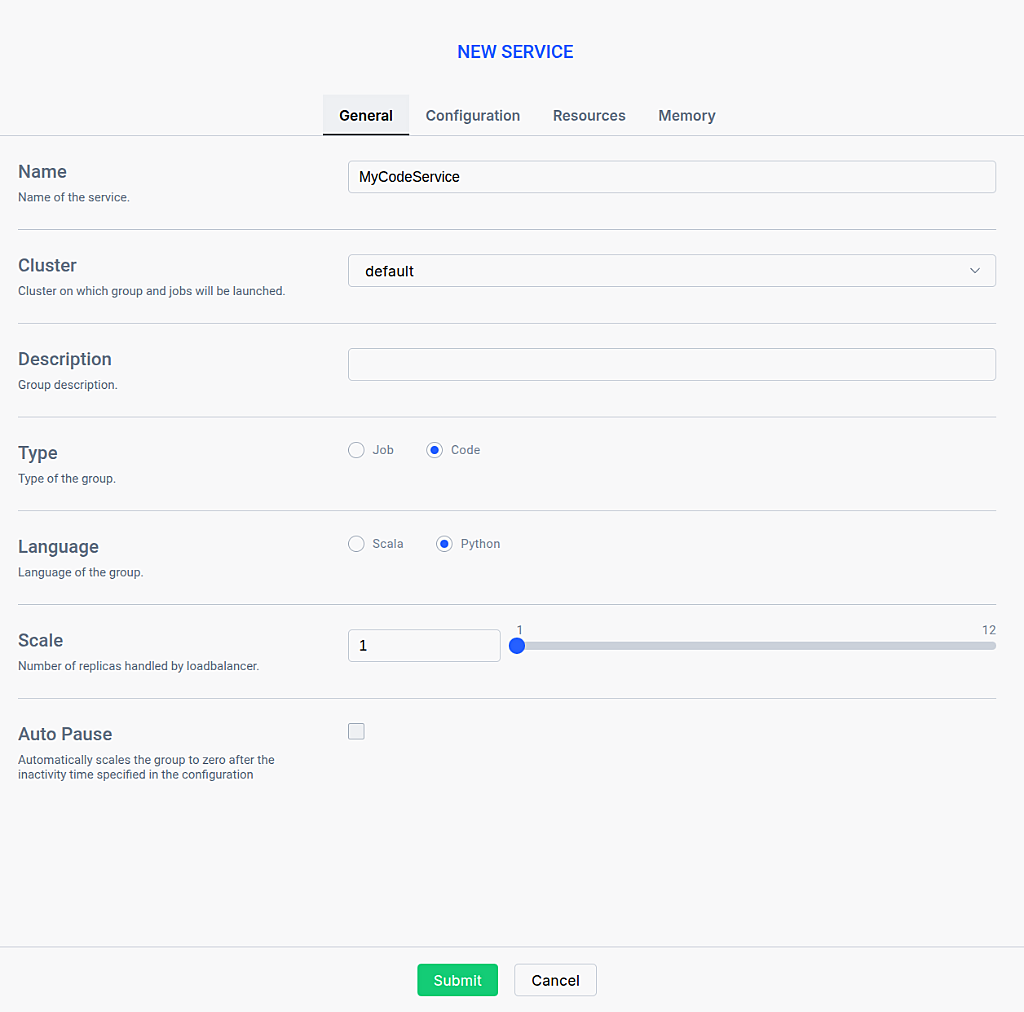
- اسم: Enter a unique name for your service (e.g.,
-
Optional Configuration: Navigate through the tabs to configure resources, Spark configurations, and dependencies. See the Interactive Service Configuration Reference below for details.
-
Activate the Service: Click خلق to launch the persistent Spark session.
-
Locate Your Service: Once the service is activated, find it in the Services list. The service may take a few moments to start up and will show a "Starting" status. Wait until the status shows "Running" before proceeding. Click on the service to view the service details.
Creating Interactive Spark Services via REST API
You can create interactive Spark services programmatically via the Ilum API, enabling automation through scripts, CI/CD pipelines, or orchestration tools.
Before creating services via API, you need to expose the Ilum Core API. See Accessing the API for instructions on port forwarding, NodePort, or Ingress setup.
Create Code Service
To create a Code type service, use the /api/v1/group endpoint with بيانات متعددة الأجزاء / النماذج:
حليقه -X منصب 'http://localhost:9888/api/v1/group' \
  --form 'name="MyCodeService"' \
  --form 'type="code"' \
  --form 'clusterName="default"' \
  --form 'language="PYTHON"' \
  --form 'scale="1"'
حليقه -X منصب 'http://localhost:9888/api/v1/group' \
  --form 'name="MyScalaCodeService"' \
  --form 'type="code"' \
  --form 'clusterName="default"' \
  --form 'language="SCALA"' \
  --form 'scale="1"'
Response:
{
  "معرف المجموعة": "20251222-1209-bw4pf"
}
مهم: Save the معرف المجموعة value - you'll need it for code execution and status checks!
API Creation Fields
| Field | Required | نوع | وصف |
|---|---|---|---|
اسم | نعم | خيط | Unique name for the service |
نوع | نعم | خيط | Must be set to "code" for Code services |
clusterName | نعم | خيط | Target cluster (usually "default") |
اللغة | نعم | خيط | PYTHON أو SCALA |
مِيزَان | لا | number | Number of replicas (default: 1) |
pyFiles | لا | ملف | Python dependencies (.py, .zip, .egg files) |
الجرار | لا | ملف | Additional JAR dependencies |
الملفات | لا | ملف | Additional files to include |
كونف | لا | JSON | Spark configuration as key-value pairs |
autoPause | لا | boolean | Enable automatic pause on inactivity |
Verify Service Creation
After creating the service, verify it's running:
حليقه http://localhost:9888/api/v1/group
Wait for service حالة to be ACTIVE and job حالة to be READY before executing code. This typically takes 10-15 seconds after creation.
Execution Methods
Once your service is running, you can start executing code snippets interactively.
- واجهة مستخدم Ilum
- واجهة برمجة تطبيقات REST
Using the Interactive Execution Panel
-
Open the Execution Panel: Click on the "Execute Job" button in the service details view.

-
Write Code: Enter your Scala or Python code in the editor.
طبع("2 + 2 =", 2+2)
x = 10
طبع("x =", x) -
أعدم: Run the code to see immediate results.
-
Verify Results: Output is displayed below the editor.

Before executing code via the API, you need to expose the Ilum Core API. See Accessing the API for instructions on port forwarding, NodePort, or Ingress setup.
Execute code fragments programmatically. Replace {{groupId}} with your service's group ID:
حليقه -X منصب "http://ilum-core:9888/api/v1/group/{{groupId}}/job/execute" \
  -H "Content-Type: application/json" \
  -d '{
    "type": "interactive_code_execute",
    "code": "2+2"
  }'
| Field | نوع | وصف |
|---|---|---|
نوع | خيط | ضبط على interactive_code_execute. |
code | خيط | The code snippet to execute. |
استنتاج: Congratulations! You've successfully set up and run an Interactive Code Service in Ilum. This tool is perfect for developers and data scientists looking for a flexible, interactive environment to work directly with Spark in real-time.
What is an Interactive Spark Service?
An Interactive Spark Service (Code Type) is a persistent environment on Kubernetes that starts immediately and maintains an active session for real-time interaction. Here's how it works:
- Persistent Session: Once created, the service launches Kubernetes pods (one driver + multiple executors) that remain running, creating a ready computational engine waiting for your commands.
- Stateful Execution: You send code fragments (e.g., PySpark or Scala snippets) via the UI or API, and the engine executes them within the ongoing session context. Previously loaded DataFrames, defined variables, and imported libraries remain available across requests.
- No Cold Start: Since the session is always warm, you get immediate execution without waiting for pod initialization on each request.
- Perfect For: Exploratory data analysis, iterative development, rapid prototyping, and seamless integration with tools like Jupyter or Zeppelin.
Interactive Code vs Batch Jobs
| الجانب | Interactive Service (Code) | Batch Job |
|---|---|---|
| Session | Persistent session, always running | No session, fresh start each time |
| State | Preserves DataFrames, variables, libraries | Isolated runs, no state between executions |
| Startup | Warm, ready to execute immediately | Cold start for each execution |
| أفضل ل | Interactive analysis, notebooks, prototyping | Batch processing, scheduled pipelines, production ETL |
| Resource Usage | Continuous (can be paused when idle) | Resources only during execution |
| Execution Model | Send code snippets on demand | Submit complete artifacts (JAR/script) |
Use Code Type when:
- You need to explore data interactively and iterate quickly
- You're developing and testing code in a notebook environment
- You want to maintain context between multiple operations
- You need immediate feedback without cold start delays
- You're prototyping or experimenting with data transformations
Use Job Type when:
- You have predefined, repeatable batch processing tasks
- You need complete isolation between runs for reproducibility
- You're running scheduled or automated data pipelines
- You want to minimize resource consumption (only run when needed)
Benefits of Code Type Services
Code type services provide key advantages for interactive data work:
-
Persistent Session State:
- DataFrames, variables, and libraries remain available across requests
- No need to reload data or reinitialize environments between operations
- Seamless continuation of work where you left off
-
Immediate Execution:
- Warm session means no cold start delays
- Get instant feedback on code changes
- Perfect for iterative development and experimentation
-
Notebook Integration:
- Seamlessly integrates with Jupyter, Zeppelin, and other notebook environments
- Send code cells directly to the service via API
- Collaborative data exploration across teams
-
Flexible Exploration:
- Test hypotheses quickly without waiting for job initialization
- Refine analyses on the fly based on intermediate results
- Ideal for data scientists and analysts doing exploratory work
-
تحسين الموارد:
- Auto-pause feature conserves resources during inactivity
- Quick resume when you're ready to continue
- Balance between always-available and cost-effective
Interactive Service Configuration Reference
- General Tab
- Configuration Tab
- Resources Tab
- Memory Tab
General Tab
- اسم: A unique identifier for the interactive service. This name will be used to track the service's status and logs within the Ilum dashboard.
- Cluster: The specific cluster where the service's resources will be allocated. Ensure the selected cluster has sufficient capacity for your interactive session.
- وصف: A brief explanation of the service's purpose. This helps other users understand what the service is used for.
- Type: The operational mode of the service. Select
رمزto establish an interactive REPL environment for running ad-hoc code snippets, orمهمةto run a specific job class interactively. - Language: The programming language used for the service (
سكالاأوبايثون). This determines the runtime environment for your code. - Scale: The number of replicas (instances) to launch for this service. Increasing the scale allows for load balancing and higher concurrency if multiple users are accessing the same service.
- Auto Pause: Automatically scales the service to zero replicas after a specified period of inactivity. This helps conserve resources when the service is not in use.
Configuration Tab
- Parameters: Key-value pairs for configuring Spark properties (e.g.,
spark.sql. الامتدادات). These settings override the default cluster configurations for this specific service. - Tags: Custom labels to categorize and filter your services. Tags are useful for organizing resources by project, team, or environment (e.g.,
ديف,تحليلات).
Resources Tab
- Jars: Additional JAR files to be included in the classpath of the driver and executors. These libraries will be available for import in your interactive code.
- Files: Auxiliary files to be placed in the working directory of each executor. These can be configuration files or data files needed by your code.
- PyFiles: Python dependencies such as
.zip,.eggأو.pyfiles. These are added to thePYTHONPATHfor Python-based interactive sessions. - Requirements: A list of additional Python packages to install on the nodes. This ensures that all necessary libraries are available for your Python environment.
- Spark Packages: Maven coordinates for Spark JAR packages to be downloaded and included. This is a convenient way to include libraries from Maven Central without manually uploading JARs.
Memory Tab
- Executors: The number of executor instances to allocate per replica. More executors allow for greater parallelism during data processing.
- Driver Cores: The number of CPU cores assigned to the driver process. This affects the driver's ability to handle task scheduling and result collection.
- Executor Cores: The number of CPU cores assigned to each executor. This determines how many tasks each executor can run simultaneously.
- Driver Memory: The amount of RAM allocated to the driver. Sufficient memory is crucial for the driver to manage application state and large results.
- Executor Memory: The amount of RAM allocated to each executor. This directly impacts the amount of data that can be cached and processed in memory.
- Dynamic Allocation: Enables the automatic scaling of the number of executors based on workload. When enabled, Ilum will request more executors when busy and release them when idle.
- Initial Executors: The initial number of executors to start with when dynamic allocation is enabled. This provides a baseline capacity when the service starts.
- Minimal number of executors: The lower bound for the number of executors when dynamic allocation is enabled. The service will never scale below this number.
- Maximal number of executors: The upper bound for the number of executors when dynamic allocation is enabled. This prevents the service from consuming too many cluster resources.
Common Questions (FAQ)
How do I persist variables between executions?
In an Interactive Code Service, the Spark session remains active between requests. Any variable defined or DataFrame loaded in one execution step is stored in the memory of the driver or executors and is available for subsequent steps, just like in a Jupyter notebook.
Can I use external libraries?
Yes. You can attach JARs (for Scala/Java) or PyFiles/Requirements (for Python) in the موارد tab during service creation. These dependencies are distributed to all Spark executors.
Does the service consume resources when idle?
Yes, because the pods are kept running to ensure immediate execution. However, you can configure Auto Pause in the General tab to automatically scale down the service to zero replicas after a set period of inactivity, saving costs.